⚡ Quick Answer
GoHighLevel white label lets marketing agencies rebrand the entire GoHighLevel platform as their own proprietary software. White label begins on the Unlimited plan at $297 per month, which unlocks custom domain, custom login, agency branding, and full desktop app rebranding across unlimited sub-accounts. Full SaaS mode with automated Stripe billing, sub-account provisioning, and pass-through rebilling requires the Agency Pro plan at $497 per month. A fully branded iOS and Android mobile app is a separate add-on at approximately $497 per month on top of either plan. Setup takes 2 to 4 hours for someone experienced, or 5 to 7 business days when handled by a specialist. GHL Desk builds complete white label configurations for agencies in 48 hours, including DNS, SSL, DKIM/SPF/DMARC, SaaS Configurator, mobile app coordination, and snapshot deployment.
Every article ranking for GoHighLevel white label right now covers the same three things: pick the plan, point the DNS, configure the settings. What none of them cover is the operational reality of running white label at scale. What breaks in month 3. Why 40 percent of first-time white label agencies have their brand exposed to a client within 90 days. How the fulfillment layer, email deliverability, mobile app timing, and support workflow all interact to make white label either a real business asset or an expensive illusion. This guide covers everything.
Written for agency owners who are past the introduction phase and want the complete operator playbook: the technical setup, the SaaS Mode business model, the mobile app economics, the compliance layer, the mistakes that cost real money, and the maintenance discipline required to keep white label intact across dozens of sub-accounts.
What GoHighLevel White Label Actually Is
GoHighLevel white label is the platform’s built-in capability that lets agencies remove every visible GoHighLevel branding element and replace it with their own agency brand. When configured correctly, clients log in through your custom domain, see your logo throughout the interface, receive emails from your sending domain, click links branded with your URL, and interact with what appears to be your proprietary software.
The client never encounters the word “GoHighLevel” anywhere in the experience. No branded emails, no LeadConnector references, no gohighlevel.com URLs in the address bar, no HighLevel logos on login screens. From the client’s perspective, your agency built and owns the CRM they use daily. This is the entire point of white label. It is not a cosmetic feature. It is a fundamental repositioning of your agency from a service provider that resells a platform into a software company that owns proprietary technology.
The technical white label layer covers six distinct configuration areas: the whitelabel domain for desktop web app login, the API domain for system-generated links in emails and SMS, the email sending domain with proper authentication, the agency-level branding assets (logo, favicon, colors, legal URLs), the mobile app branding (optional, separate add-on), and the SaaS mode configuration for automated client billing and provisioning. Each area has its own setup process, and skipping any one of them leaves visible GoHighLevel branding exposed to clients.
The strategic white label layer covers the business model transformation that white label enables: charging clients recurring software subscriptions instead of one-time projects, packaging the platform as branded proprietary technology, activating pass-through rebilling for SMS and email usage, and building an agency that has actual enterprise value because it owns customer relationships to branded software rather than raw service capacity.
GoHighLevel White Label Pricing: The Complete Cost Breakdown
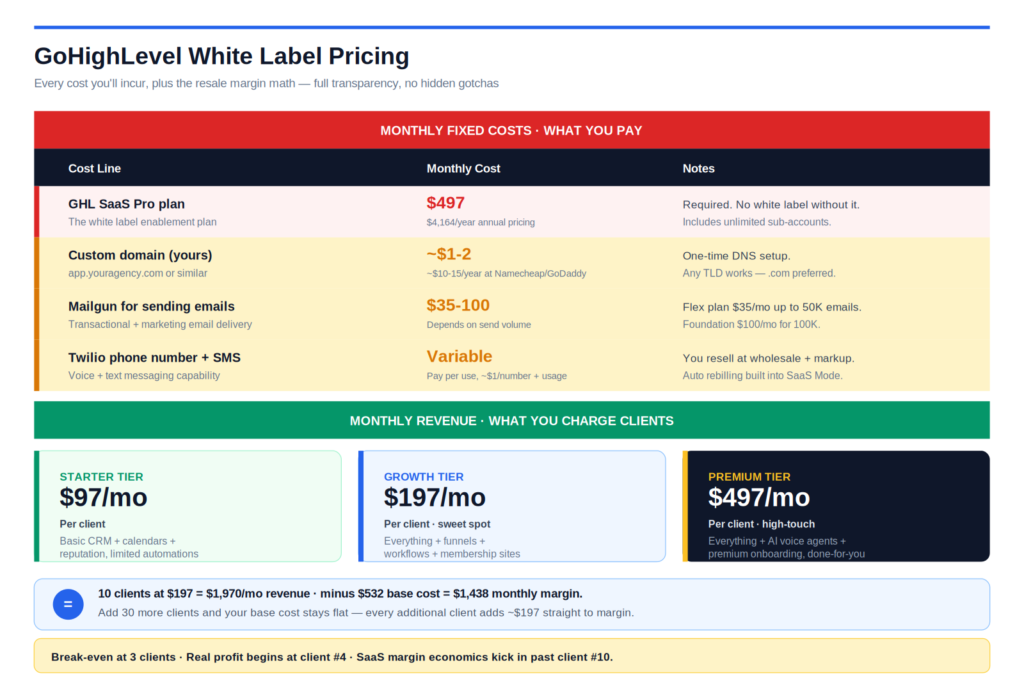
White label pricing has three layers: the base plan cost, optional add-ons, and usage-based costs that pass through to clients under SaaS mode.
Starter Plan at $97 per month does not support white label in any meaningful form. Limited to 3 sub-accounts, no custom domain capability, no logo replacement, no email branding. Agencies stay on Starter only during the earliest testing phase, then upgrade before ever launching white label to clients.
Unlimited Plan at $297 per month is the entry point for real white label. Unlimited sub-accounts, full desktop web app rebranding, custom domain support, custom login screen, agency-level branding controls, API domain, and dedicated sending domain configuration. No automated SaaS billing, no pricing plan configurator, no automatic sub-account provisioning, no mobile app. This plan works for agencies managing clients manually with external billing (Stripe invoices, external payment processors). Annual billing drops the effective cost to approximately $248 per month.
Agency Pro Plan at $497 per month unlocks SaaS mode. Everything in Unlimited plus the SaaS Configurator, automated Stripe billing, automatic sub-account provisioning on payment, pricing plan tiers, pass-through rebilling for SMS, email, phone, and AI usage, plus Google login for white label agencies. This plan transforms the agency into a genuine software business. Annual billing drops the effective cost to approximately $414 per month.
White Label Mobile App costs approximately $497 per month as a separate add-on on top of either plan, plus a one-time setup fee typically between $500 and $2,000, plus Apple Developer account ($99 per year) and Google Play Developer account (one-time $25). This add-on delivers fully branded iOS and Android apps published under your agency name in the App Store and Google Play. Most agencies skip this until they have 20 or more active paying clients because the cost only breaks even at that scale.
Total realistic white label cost examples:
For an agency running desktop-only white label on the Unlimited plan, monthly cost is approximately $297 base plus $100 to $200 in usage across 5 to 10 sub-accounts, totaling roughly $400 to $500 per month.
For an agency running full SaaS mode on Agency Pro, monthly cost is approximately $497 base plus $200 to $500 in usage across 15 to 25 sub-accounts, totaling roughly $700 to $1,000 per month. With rebilling active on SaaS mode, most of this usage cost passes through to clients as markup revenue.
For an agency running Agency Pro plus the mobile app, monthly cost is approximately $497 base plus $497 mobile add-on plus $200 to $500 usage, totaling roughly $1,200 to $1,500 per month plus a one-time setup fee of $500 to $2,000 for the mobile app configuration.
Prerequisites Before You Start White Labeling
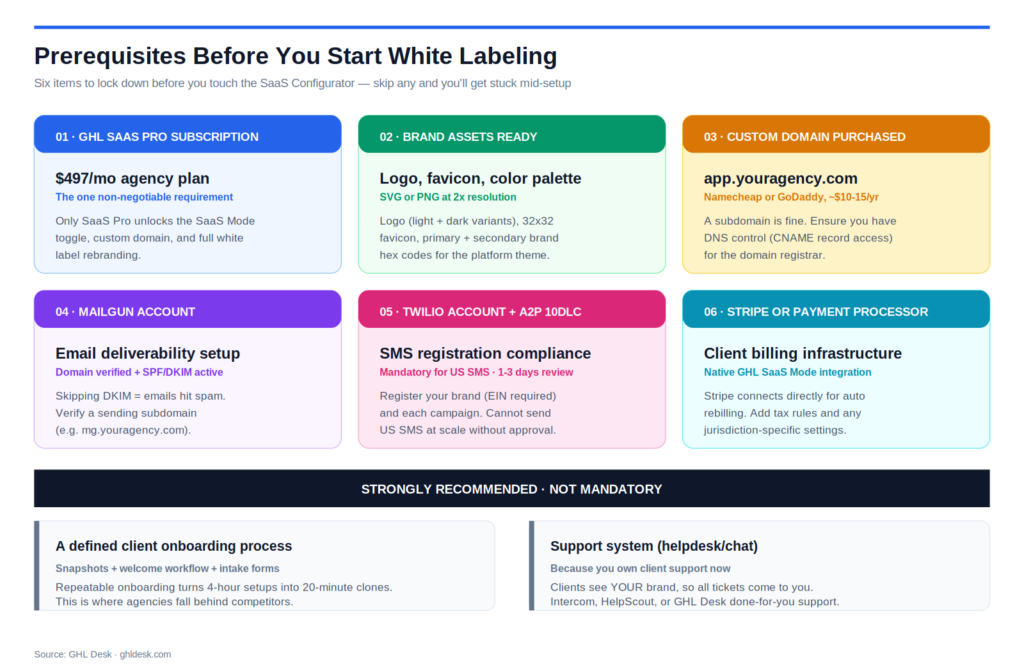
Several prerequisites need to be in place before beginning the technical setup. Skipping any of them creates delays or forces you to redo work.
GoHighLevel plan on Unlimited or Agency Pro. Starter does not support white label. Upgrade before proceeding.
A custom domain you own. Typically the domain your agency already uses for its main website. You do not need to buy a new domain; you use a subdomain of your existing agency domain (like app.youragency.com or crm.youragency.com).
Access to your domain’s DNS provider. This is either your domain registrar (GoDaddy, Namecheap, Cloudflare) or a separate DNS host if you have moved DNS management. You need admin access to create CNAME records.
Brand assets ready to upload. Company logo as a transparent PNG at roughly 350 x 180 pixels, under 2.5 MB. Custom favicon as ICO or PNG. Brand color HEX codes for primary color, secondary color, and text colors. Privacy Policy URL and Terms and Conditions URL on your agency website.
Stripe account for SaaS mode. Required only if you are activating SaaS mode on Agency Pro. A verified Stripe account with your business details, tax information, and payout details configured.
Sending domain for email. A subdomain of your agency domain that will handle outbound email (like mail.youragency.com or send.youragency.com). This domain will get SPF, DKIM, and DMARC records configured.
A2P 10DLC brand and campaign registration. Required for legal SMS operation in the United States. This is a separate compliance process through GoHighLevel that takes 5 to 15 business days for approval.
Master snapshot library. Not technically a prerequisite for turning on white label, but critical for operational success. Without a mature snapshot, every new client requires manual configuration inside a branded shell, which defeats the operational advantage of white label.
Step-by-Step: The Complete White Label Setup
The complete white label setup involves six distinct configuration streams that need to happen in the correct order. Doing them out of order causes DNS delays, SSL provisioning failures, and broken client-facing links.
Step 1: Upgrade to Unlimited or Agency Pro plan. Confirm the plan is active before touching any DNS records.
Step 2: Configure the whitelabel domain (desktop web app). Create the CNAME record at your DNS provider, add the subdomain in GoHighLevel Agency Settings, wait for DNS propagation and SSL provisioning.
Step 3: Configure the API domain (branded links). Create a second CNAME record for a different subdomain, add it in GoHighLevel Agency Settings, verify.
Step 4: Configure email sending domain with authentication. Set up SPF, DKIM, DMARC records for the sending subdomain, verify authentication passes.
Step 5: Upload agency branding assets. Logo, favicon, brand colors, Privacy Policy and Terms URLs in Agency Company Settings.
Step 6: Complete A2P 10DLC registration. Register your business brand and campaign with GoHighLevel for legal SMS operation.
Step 7: Activate SaaS mode (Agency Pro only). Connect Stripe, configure SaaS Configurator, create pricing plans, test the full signup flow.
Step 8: Configure white label mobile app (optional). Submit branding assets, coordinate app store publishing, wait 4 to 6 weeks for approval.
Step 9: Deploy master snapshot to a test sub-account. Verify every branded element appears correctly to a test user before launching to a real client.
Step 10: Document the entire configuration. Every DNS record, every credential, every branding decision documented in a single place for team reference and disaster recovery.
The following sections cover each configuration area in operational depth.
The Whitelabel Domain Configuration (Desktop Web App)
The whitelabel domain is the branded URL your clients use to log into the platform. Instead of app.gohighlevel.com, clients access app.youragency.com. This is the most visible white label element and the one clients notice first.
Choose your subdomain. Common choices are app.youragency.com, crm.youragency.com, portal.youragency.com, or platform.youragency.com. Use a subdomain, not the root domain. The root domain (youragency.com) is reserved for your marketing website.
Create the CNAME record at your DNS provider.
- Host or Name field: the subdomain part only (like “app” if your full URL is app.youragency.com)
- Value or Target field: whitelabel.ludicrous.cloud
- TTL: default (typically 3600 seconds)
Cloudflare users specifically. Set the CNAME to DNS only mode, represented by the grey cloud icon. Do not use the orange cloud proxy mode. Proxy mode blocks SSL certificate provisioning from Let’s Encrypt, which causes the classic “your connection is not private” error that trips up 30 to 40 percent of first-time setups.
Add the domain in GoHighLevel Agency Settings. Navigate to Agency View → Settings → Company → Whitelabel → Whitelabel Domain. Enter the full subdomain including the subdomain part (like app.youragency.com, not just youragency.com). Click Update.
Wait for DNS propagation and SSL. DNS propagation typically takes 5 to 30 minutes but can take up to 24 hours in edge cases. Once DNS resolves correctly, SSL is issued automatically via Let’s Encrypt within a few minutes. Test by opening your subdomain in a browser (like https://app.youragency.com) and confirming the branded login page loads with a secure HTTPS connection.
Common failure modes. DNS record pointing to the wrong target (this is the number one setup error), Cloudflare proxy enabled instead of DNS only, conflicting A record on the same subdomain blocking SSL provisioning, subdomain typed with capital letters (must be lowercase), or the domain saved with a trailing slash in GoHighLevel Settings.
The API Domain Configuration (Branded Links)
The API domain is the second critical white label element, and it is the one competitors skip most often. This domain brands the system-generated links that appear inside emails, SMS messages, calendar invites, form submissions, survey links, trigger links, review requests, and short URLs. Without an API domain configured, every link inside every client-facing message shows gohighlevel.com or msgsndr.com, which instantly breaks the white label illusion.
Choose your API subdomain. Common choices are link.youragency.com, links.youragency.com, or go.youragency.com. Use a subdomain distinct from your whitelabel domain.
Create the CNAME record.
- Host or Name field: your chosen subdomain (like “link”)
- Value or Target field: brand.ludicrous.cloud
- TTL: default
Add the API domain in GoHighLevel. Navigate to Agency View → Settings → Company → API Domain. Enter the full subdomain and click Update.
Verify propagation. Send a test email or SMS from a sub-account that contains a form link, calendar link, or trigger link. Confirm the URL in the message uses your custom link subdomain rather than gohighlevel.com.
Sub-account level configuration. For agencies serving clients who want their own branded links (client’s own domain), the API domain can also be configured at the individual sub-account level. This is optional but valuable for clients who care about their own brand appearing in messaging.
Email Sending Domain and Deliverability Setup
Email deliverability is where white label configurations most commonly fail in months 2 to 4. Everything appears to work initially, but inbox placement drops slowly as reputation degrades from sending on a shared domain without proper authentication. Configuring this correctly from day one prevents deliverability collapse.
Choose your sending subdomain. Options include mail.youragency.com, send.youragency.com, or reply.youragency.com. This subdomain will be the “from” domain on all outbound emails.
Configure the four required DNS records.
| Record Type | Purpose | Example Value |
|---|---|---|
| SPF | Authorizes sending IPs | v=spf1 include:mailgun.org ~all |
| DKIM | Digital signature verification | k=rsa; p=[long public key] |
| DMARC | Failed-auth handling policy | v=DMARC1; p=none; rua=mailto:reports@youragency.com |
| MX | Directs incoming mail | mxa.mailgun.org (priority 10) |
Add the sending domain in GoHighLevel. Navigate to Agency View → Settings → Email Services → Dedicated Sending Domain. Enter your sending subdomain. GoHighLevel will provide the specific DNS records to add.
Verify authentication. After DNS propagates, GoHighLevel’s interface will show green checkmarks for each authentication record. Send a test email to a Gmail address, click “show original” in Gmail, and verify SPF, DKIM, and DMARC all pass.
Configure per sub-account. Each sub-account can either use the agency-level sending domain or configure its own client-specific sending domain. For high-volume clients, dedicated per-client sending domains produce better deliverability. For most agencies, the agency-level shared domain is sufficient.
Warm up the sending domain. New sending domains have zero reputation. Send low volume for the first 2 to 4 weeks (under 500 emails per day), gradually scaling up. Aggressive volume in the first 2 weeks triggers spam filters and permanently damages the domain’s reputation.
A2P 10DLC and SMS Compliance
A2P 10DLC compliance is required for legal SMS operation in the United States. Skipping this step causes carriers to filter or block your SMS traffic within 30 to 90 days, at which point the fix takes weeks and any existing conversations are lost.
Register your business brand. Navigate to Agency View → Phone Number → Trust Center. Complete the brand registration form with your business legal name, EIN, business address, and website. Approval typically takes 24 to 72 hours.
Register your campaign. After brand approval, register a campaign describing the type of messaging you send (marketing, notifications, mixed, appointment reminders). Include sample message content. Campaign approval takes 3 to 10 business days.
Configure per sub-account. Each sub-account operating in the United States needs its own campaign registration under the agency brand. This is why the agency brand needs to be registered as a reseller model, not a direct model.
Ongoing compliance. Every message template needs to include an opt-out mechanism (like “Reply STOP to unsubscribe”). Every SMS-enabled workflow needs a clear opt-in trigger. Every contact needs documented consent to receive SMS. Failing any of these creates real regulatory exposure under TCPA.
Agency Branding: Logo, Colors, Legal URLs
The visual branding layer replaces GoHighLevel’s default appearance with your agency’s brand identity.
Upload agency logo. Navigate to Agency View → Settings → Company. Upload your logo as a transparent PNG at approximately 350 x 180 pixels, under 2.5 MB. This logo appears on the login page and in the top-left corner of the dashboard.
Upload custom favicon. In the same settings area, upload a favicon (typically ICO or PNG at 32 x 32 pixels or 64 x 64 pixels). This appears in browser tabs.
Set brand colors. Enter HEX codes for primary color (used for buttons, links, active states), secondary color (used for backgrounds, hover states), and text colors. These colors apply throughout the interface consistently.
Add legal URLs. Paste the full URLs for your Privacy Policy and Terms and Conditions. These appear as footer links on the login page and are legally required for compliant operation.
Configure support contact. Set the support email address and support phone number that appear when clients look for help. This should route to your team, not GoHighLevel’s support.
Customize the login page welcome text. Add a headline and optional welcome message that appears above the login form. This is the first thing clients see and should reflect your agency brand voice.
Custom CSS and JS (advanced). On Agency Pro, custom CSS and JavaScript can be added to further customize the interface. This is used for hiding specific menu items, renaming sections, or applying more sophisticated brand modifications. Requires developer support.
The White Label Mobile App: Cost, Timeline, and When to Add It
The white label mobile app is the highest-perception white label element and the most expensive. It transforms the client relationship from “you gave me access to a web platform” to “I use your proprietary iOS and Android software daily.”
Cost breakdown. Monthly subscription: approximately $497 per month on top of your existing GoHighLevel plan. One-time setup fee: typically $500 to $2,000 depending on branding complexity. Apple Developer Program: $99 per year. Google Play Developer Program: $25 one-time.
First-year total cost. Approximately $6,464: $5,964 in GoHighLevel monthly fees ($497 x 12), $99 Apple Developer, $25 Google Play, plus the one-time setup fee of $500 to $2,000.
Year 2 and beyond. Approximately $1,287 per year plus GoHighLevel monthly ($5,964): the ongoing $497 per month plus Apple’s $99 renewal, with no repeat setup fee.
Setup timeline. Design assets and configuration take 1 to 2 weeks. GoHighLevel’s team handles the app compilation and store submissions. App Store approval typically takes 2 to 4 weeks. Google Play approval typically takes 3 to 7 days. Total timeline from decision to live app: 4 to 8 weeks.
When it makes sense. Agencies with 20 or more active paying clients on SaaS mode. At smaller scale, the mobile app cost exceeds the revenue uplift it produces. At 20+ clients paying $297+ per month for branded software access, the mobile app becomes a clear ROI positive addition.
When it does not make sense. Solo operators. Agencies on the Unlimited plan without SaaS mode. Agencies running project-based service work rather than subscription software. Agencies where clients rarely need mobile access to the platform.
Design assets required. App icon (multiple sizes for iOS and Android), splash screen graphics, primary and secondary brand colors, App Store screenshots (typically 5 to 8 images demonstrating key features), App Store description text, and privacy policy URL specific to the mobile app.
SaaS Mode: Turning White Label Into a Software Business
SaaS mode is the feature that transforms white label from a rebranded service delivery tool into a genuine software business. This is where the high-margin economics show up.
What SaaS mode does. Connects your Stripe account to GoHighLevel, exposes a SaaS Configurator for setting pricing plans, automates the entire client signup and provisioning flow, and enables pass-through rebilling for usage costs.
The signup flow. A prospective client visits your branded signup page (hosted on your white label domain), selects a pricing plan, enters payment information, pays via Stripe. GoHighLevel automatically creates a sub-account, generates login credentials, deploys your master snapshot, sends the welcome email, and starts billing. The client goes from “interested” to “using your software” without any manual involvement from your team.
Pricing plan tiers. Typical SaaS mode agencies structure 3 to 4 tiers:
| Tier | Typical Price | Features Gated |
|---|---|---|
| Starter | $97 per month | CRM, basic workflows, calendar, contact management |
| Growth | $197 per month | Adds email, SMS, reputation management |
| Professional | $297 per month | Adds funnels, membership sites, social planner |
| Agency | $497 per month | Full platform access, priority support, SLA |
Pass-through rebilling. SaaS mode lets you automatically charge clients for usage of SMS, email, phone minutes, and AI. GoHighLevel calculates the client’s usage, applies your configured markup, and charges their credit card automatically. Typical markup: 1.5x to 2.5x cost. A client using $50 in SMS costs you $50 but generates $75 to $125 in additional revenue.
Margin math at scale.
| Client Count | Client Price | MRR | Platform Cost | Net Profit | Gross Margin |
|---|---|---|---|---|---|
| 10 clients | $297 | $2,970 | $497 | $2,473 | 83% |
| 25 clients | $297 | $7,425 | $497 | $6,928 | 93% |
| 50 clients | $197 | $9,850 | $497 | $9,353 | 95% |
| 100 clients | $197 | $19,700 | $497 | $19,203 | 97% |
Requirements to activate. Agency Pro plan, verified Stripe account, at least one master snapshot ready for automatic deployment, a public-facing signup page, and pricing plan definitions inside the SaaS Configurator.
When to activate. After Stage 3 of agency growth (typically 11 to 15 stable clients). Activating SaaS mode too early attracts clients you cannot support operationally. Activating too late leaves recurring revenue on the table.
White Label Discipline: What Kills Your Brand Illusion
Configuring white label technically is not the same as maintaining white label operationally. Real white label requires ongoing discipline across your entire team. These are the specific ways white label breaks after launch.
Team members sending emails from personal accounts. A specialist emails a client from their personal Gmail instead of your agency domain. Instantly exposes the operational structure. Fix: strict policy that all client communication happens through the agency email domain, no exceptions.
Support tickets routed to GoHighLevel’s support. A client emails your support address with a platform issue, your team responds with “let me escalate this to GoHighLevel.” Fix: your team owns platform-level issues visibly and handles escalation to GoHighLevel behind the scenes.
LeadConnector app references leaking through. A client asks about the mobile app and gets told to “download LeadConnector from the App Store.” Fix: either invest in the white label mobile app, or explicitly script the conversation around the web app only.
GoHighLevel branding in email templates. Default email templates inside your snapshot contain GoHighLevel branding or default LeadConnector references. Fix: audit every email template in the master snapshot before deployment.
Uncustomized email notifications. GoHighLevel’s system emails (password reset, invite emails, notifications) sometimes revert to default HighLevel branding. Fix: check every system email template quarterly and re-brand as needed.
Onboarding materials referencing GoHighLevel. Your team hands a new client an onboarding PDF that mentions HighLevel or GoHighLevel by name. Fix: all client-facing documentation uses your agency’s product name exclusively.
Third-party tool integrations leaking. Integrations that reveal underlying platform (like Zapier connections showing “GoHighLevel” in the source field). Fix: document which integrations are safe to reveal and which require white-labeled proxies.
Team members openly discussing GoHighLevel on public forums. Your specialists posting about GoHighLevel workflows on Reddit or Facebook groups while representing your agency. Fix: professional communication guidelines for team members with public presence.
Wrong sender name on outbound emails. Emails going to clients from “GoHighLevel Notifications” or “LeadConnector” because a workflow was not configured with a custom sender. Fix: audit every workflow’s email actions for correct sender configuration.
Support articles linking to help.gohighlevel.com. Client-facing help articles linking to GoHighLevel’s public documentation. Fix: rebuild the knowledge base under your domain with your own screenshots and language.
Multi Sub-Account White Label at Scale
At 10, 20, 30 sub-accounts, white label configuration becomes a real operational discipline. What was manageable manually at 3 sub-accounts becomes impossible without systems.
Master snapshot with white label baked in. Every white label configuration decision (email sender name, sending domain, notification templates, branded language) needs to be inside your master snapshot. New sub-accounts deployed from the snapshot inherit correct white label configuration automatically.
Per-sub-account customization protocols. Some clients need their own branded sending domain, their own API domain for links, or their own mobile app icon variations. Document which customizations happen at agency level versus sub-account level, and which sub-accounts get which customizations.
Regular white label audits. Every 60 to 90 days, run a full audit of every sub-account: log in as a client, click through the primary user flows, verify no GoHighLevel branding is visible anywhere. Document any findings and fix immediately. Most agencies discover 3 to 8 white label leaks in their first audit.
Team training and SOPs. Every team member serving clients needs written SOPs on white label discipline: what language to use, what documents to send, how to handle platform-level questions, when to escalate versus resolve directly. Without SOPs, individual team members improvise and expose the underlying platform.
Version control on the snapshot. As you improve white label configuration in the master snapshot, keep a changelog. When you deploy the newer version to existing clients, know exactly what changed.
Support ticket workflow. All client-facing support tickets should route through your agency’s helpdesk, not GoHighLevel’s. Configure the support widget inside the platform to open your ticket system, not GoHighLevel’s.
What Goes Wrong in Months 3 to 6 After Launch
Every article about white label covers the setup. Almost none cover what breaks 3 to 6 months later. Here is what actually happens.
Email deliverability degrades. Initial email sends work fine. Around month 2 to 3, inbox placement starts dropping. By month 4, some clients report emails going to spam. By month 6, engagement rates on branded emails are 30 to 50 percent below industry benchmarks. Root cause: sending domain reputation was not warmed properly, or the shared sending domain got flagged due to another user’s practices. Fix: dedicated per-client sending domains for high-volume clients, aggressive reputation monitoring, warm-up sequences for new domains.
SSL certificates fail to renew. Let’s Encrypt certificates renew automatically in most cases. Occasionally, DNS changes or CNAME modifications interrupt renewal. Clients see “your connection is not private” errors and panic. Fix: SSL monitoring on the whitelabel domain and API domain with alerts if certificate expiry is under 15 days.
Client discovers GoHighLevel through a leaked reference. A client Googles a specific error message and finds GoHighLevel documentation. Or receives an email that accidentally references LeadConnector. Or the mobile app on their phone still shows LeadConnector because the white label mobile app was never added. The client feels deceived, even if the technology decision was reasonable. Fix: total white label commitment from day one, or explicit disclosure of the underlying platform if you cannot afford full white label.
Snapshot updates break existing sub-accounts. You update the master snapshot with new workflows or fixed configurations. Deploying to existing sub-accounts creates duplicates, breaks existing custom modifications, or silently overwrites client-specific data. Fix: strict version control on snapshots, careful manual updates to existing sub-accounts, extensive testing before global deployments.
A2P SMS registration expires or gets rejected. Some SMS campaigns get flagged and require re-registration. Some brand registrations expire and need renewal. Clients suddenly cannot send SMS. Fix: quarterly compliance review with GoHighLevel’s Trust Center, active monitoring of SMS delivery rates.
Mobile app rejection or delays. Apple’s review process is unpredictable. Apps get rejected for policy violations, privacy declarations, or reviewer whim. Delays of 4 to 8 weeks can happen. Meanwhile, your marketing has already announced the branded app to clients. Fix: never announce mobile app availability until it is live in both stores; use conservative timelines.
Team scaling breaks white label discipline. You hire a new specialist. They accidentally email a client from personal Gmail. They mention GoHighLevel in a Slack channel a client can see. They send an onboarding email with the wrong sender name. Every new team member is a white label risk until they have completed white label training. Fix: mandatory white label training for every hire, plus 90-day audit of all their client interactions.
Payment processing failures. Stripe declines start happening for clients whose cards updated. SaaS mode continues billing, generates failures, sub-accounts get suspended, clients complain. Fix: dunning management workflows, automatic customer notification of failed payments, grace period configuration in SaaS mode.
Rebilling disputes. Clients see charges for SMS or email usage they did not understand. They contest the charges with Stripe. Chargeback rates rise. Fix: transparent usage reporting in the client dashboard, invoice line items that explain each charge, proactive notification when usage is trending high.
Common White Label Setup Mistakes That Cost Agencies Money
Understanding what other agencies do wrong prevents you from repeating them.
Cloudflare orange cloud proxy enabled on the whitelabel domain. The most common technical setup failure. Proxy mode blocks SSL provisioning. Result: broken login pages, “your connection is not private” errors, panicked clients. Fix: set the CNAME to DNS only mode (grey cloud).
Same subdomain used for whitelabel and API domain. Some agencies mistakenly point both the whitelabel domain and API domain to the same subdomain. Result: routing conflicts, broken links, DNS confusion. Fix: use distinct subdomains for each (like app.youragency.com for whitelabel and link.youragency.com for API domain).
Skipping the email sending domain entirely. Agency configures the whitelabel domain, uploads a logo, and calls it done. Emails still send from GoHighLevel’s shared domain. Result: LeadConnector references in email headers visible to any technical client, mediocre deliverability. Fix: dedicated sending domain with full SPF/DKIM/DMARC configuration.
Underpricing SaaS tiers at launch. Setting $97 per month as the entry tier because “we need to be competitive.” Result: the client base you attract cannot afford your fulfillment cost, churn is high, upgrading tier prices later is difficult. Fix: $197 per month minimum as entry tier, $297 or higher as primary tier.
No snapshot library before activating SaaS mode. Agency activates SaaS mode with clients signing up and getting empty sub-accounts. Result: mass complaints, high churn, brand damage. Fix: mature snapshot library deployed automatically before any SaaS mode signup goes live.
Manual onboarding for SaaS clients. Client signs up, pays, receives sub-account credentials, then agency team manually configures their account over 2 to 4 days. Defeats the entire point of SaaS mode. Fix: fully automated provisioning with snapshot deployment on payment.
No monitoring of failed workflows. Workflows silently fail. Emails do not send. SMS gets blocked. Nobody notices for weeks. Fix: internal notification actions on every critical workflow, weekly workflow health audits.
Skipping A2P 10DLC registration. Agency launches white label, sends SMS, everything works for 30 to 60 days, then SMS delivery collapses when carrier filters activate. Recovery takes weeks. Fix: complete A2P registration during initial setup, before any client-facing SMS is sent.
Weak team documentation. Agency owner keeps all white label configuration in their head. Team member changes something without understanding the implications. Configuration breaks. Fix: written documentation of every white label decision, DNS record, credential, and process.
No client escape hatch. Clients grow, want to leave, and want their data. Agency has no export process. Client relationships end badly. Fix: documented data export process that clients can trigger themselves or that your team can execute cleanly.
GoHighLevel White Label vs SaaS Mode: The Real Difference
The two terms get used interchangeably but they are not the same thing.
White label is the visual and technical rebranding of the GoHighLevel platform. Custom domain, custom logo, custom colors, custom email sending, branded links. Available on the Unlimited plan at $297 per month. Requires manual client billing and onboarding.
SaaS mode is the business automation layer that runs on top of white label. Stripe integration, automated billing, automated sub-account creation, pricing plan tiers, pass-through rebilling. Available only on Agency Pro at $497 per month. Requires white label to be already configured.
You can have white label without SaaS mode. Most agencies do at first. You cannot have SaaS mode without white label; it requires the branded infrastructure to sell to clients.
Practically, white label is the platform rebrand. SaaS mode is the operating model change. Together, they turn your agency into a software company. Alone, either one is incomplete.
Troubleshooting: SSL, DNS, and Domain Issues
Real problems and their fixes.
“Your connection is not private” error. SSL certificate has not been issued. Root causes: DNS not fully propagated (wait longer, up to 24 hours), Cloudflare orange cloud enabled (switch to grey cloud), conflicting A record on the same subdomain (delete the A record, keep only the CNAME).
Domain not loading at all. DNS record is wrong or has not propagated. Verify the CNAME points to whitelabel.ludicrous.cloud (for whitelabel domain) or brand.ludicrous.cloud (for API domain). Use a DNS lookup tool like dnschecker.org to confirm the record has propagated globally.
“SSL protocol mismatch” errors. Client’s browser is using outdated TLS. GoHighLevel supports TLS 1.2 and 1.3 only. Update browser. Confirm no conflicting DNS records blocking SSL provisioning.
Email authentication failing. SPF, DKIM, or DMARC records were entered incorrectly or have not propagated. Verify each record using MXToolbox or similar. Common errors: extra spaces in the SPF string, incorrect selector name for DKIM, missing quotes around DMARC policy.
Old whitelabel domain still showing after update. Cached configuration. Clear the whitelabel domain field completely in GoHighLevel settings, click Update Company to save, then re-enter the new subdomain and save again. Clear browser cache and test in incognito mode.
Sub-account not inheriting agency branding. Sub-account was created before agency branding was configured. Re-deploy branding settings at the sub-account level, or delete and recreate the sub-account.
Mobile app rejected by Apple or Google. Common rejection reasons: missing privacy policy URL, unclear app functionality description, incorrect content ratings, or bundle ID conflicts. Work with GoHighLevel’s white label mobile app team to address specific rejection reasons.
Payment failures in SaaS mode. Stripe integration lost authorization. Reconnect Stripe in Agency Settings. Verify webhook endpoints are functional. Check Stripe dashboard for specific decline reasons.
How GHL Desk Handles White Label Setup and Maintenance
For agencies at any stage of white label implementation, GHL Desk operates as the specialist team that handles setup, deployment, and ongoing maintenance. Onboarding for qualifying agencies is 48 hours.
Every engagement starts with a free 30-minute strategy call that audits your current white label configuration, identifies missing elements, and maps the setup or migration plan. If we are not the right fit, we say so directly.
For qualifying agencies, our team executes the complete white label configuration end to end. DNS records for whitelabel domain and API domain. SSL provisioning and verification. Email sending domain with full SPF, DKIM, DMARC configuration. Agency branding assets and login page setup. A2P 10DLC registration and campaign approval. SaaS Configurator with Stripe integration, pricing plan structure, and automated provisioning. Coordination with GoHighLevel for white label mobile app when appropriate. Master snapshot deployment across all sub-accounts. Full white label audit before launch.
For agencies already running white label, our team handles maintenance: quarterly white label audits, snapshot updates without breaking existing sub-accounts, sending domain reputation monitoring, A2P compliance renewals, SSL certificate monitoring, and support ticket handling under your white label brand.
Pricing starts at $150 for a 5-hour pay-as-you-go block for agencies testing the fit. $997 per month for a shared team handling white label maintenance and new sub-account deployment across up to 25 clients. $2,497 per month for a dedicated team handling unlimited scope including new sub-account setups, snapshot updates, A2P compliance, white label mobile app coordination, and full white label support. Enterprise options available for agencies past 50 clients running SaaS mode at scale.
Every plan is white label by default. Your clients only ever see your brand.
Book a free strategy call at ghldesk.com/book-a-call or view team plans at ghldesk.com/hire-a-team.
Frequently Asked Questions
GoHighLevel white label is the platform’s built-in capability that lets agencies remove every visible GoHighLevel branding element and replace it with their own agency brand. When configured correctly, clients log in through a custom domain (like app.youragency.com), see your agency logo throughout the interface, receive emails from your sending domain, and interact with what appears to be your proprietary software. The client never encounters the word GoHighLevel anywhere in the experience.
GoHighLevel white label begins on the Unlimited plan at $297 per month, which includes desktop app rebranding, custom domain, and unlimited sub-accounts. Full SaaS mode with automated Stripe billing requires the Agency Pro plan at $497 per month. A fully branded iOS and Android mobile app is a separate add-on at approximately $497 per month plus a one-time setup fee of $500 to $2,000. Total realistic costs range from $400 per month for basic white label to $1,500 per month for full white label with mobile app and SaaS mode.
The Unlimited plan at $297 per month is the minimum plan for real white label. It includes desktop app rebranding, custom domain, custom login screen, unlimited sub-accounts, and API access. The Agency Pro plan at $497 per month is required for SaaS mode with automated billing and sub-account provisioning. The Starter plan at $97 per month does not support any meaningful white label capability and is limited to 3 sub-accounts.
The complete white label setup involves 10 steps: (1) upgrade to Unlimited or Agency Pro plan, (2) configure the whitelabel domain via CNAME record pointing to whitelabel.ludicrous.cloud, (3) configure the API domain via CNAME pointing to brand.ludicrous.cloud, (4) set up email sending domain with SPF, DKIM, DMARC records, (5) upload agency branding (logo, favicon, colors, legal URLs), (6) complete A2P 10DLC registration for SMS compliance, (7) activate SaaS mode on Agency Pro, (8) configure white label mobile app if applicable, (9) deploy master snapshot to a test sub-account, and (10) document the complete configuration. Total setup takes 2 to 4 hours for someone experienced or 5 to 7 business days with a specialist team.
No. The Starter plan at $97 per month does not support white label. It is limited to 3 sub-accounts, offers no custom domain capability, no logo replacement, and no email branding. To white label GoHighLevel, you must upgrade to the Unlimited plan ($297/month) at minimum or the Agency Pro plan ($497/month) for SaaS mode capabilities.
The white label mobile app costs approximately $497 per month as a separate add-on on top of your GoHighLevel plan. Additional costs include a one-time setup fee of $500 to $2,000, an Apple Developer Program membership at $99 per year, and a Google Play Developer Program fee of $25 one-time. First-year total cost is approximately $6,500 including the GoHighLevel monthly plan. Most agencies add the mobile app only after reaching 20 or more active paying clients.
Yes, when configured completely and maintained with operational discipline. Complete white label requires configuring six distinct areas: whitelabel domain, API domain, dedicated email sending domain, agency branding assets, A2P SMS registration, and the white label mobile app. Even with full technical configuration, brand illusion can still break if the fulfillment team is not trained on white label discipline. 40 percent of first-time white label agencies accidentally expose GoHighLevel to a client within 90 days due to team communication errors, not technical failures.
White label is the visual and technical rebranding of the GoHighLevel platform (custom domain, custom logo, branded emails, branded links). It is available on the Unlimited plan at $297 per month. SaaS mode is the business automation layer that runs on top of white label (Stripe integration, automated billing, automatic sub-account provisioning, pricing tiers, pass-through rebilling). SaaS mode is available only on Agency Pro at $497 per month. You can have white label without SaaS mode. You cannot have SaaS mode without white label.
Setup takes 2 to 4 hours for someone experienced with GoHighLevel white label. For a first-time setup by someone new to the process, expect 1 to 2 full days including DNS propagation waits and troubleshooting. Full production readiness including SaaS Mode configuration, snapshot testing, mobile app coordination, and A2P compliance registration takes 5 to 7 business days with a specialist team, or 2 to 4 weeks when done from scratch without help.
Two separate CNAME records are required. For the whitelabel domain (desktop web app login), create a CNAME record pointing your subdomain (like app.youragency.com) to whitelabel.ludicrous.cloud. For the API domain (branded links in emails and SMS), create a second CNAME record pointing a different subdomain (like link.youragency.com) to brand.ludicrous.cloud. On Cloudflare, both records must be set to DNS only mode (grey cloud), not proxy mode (orange cloud), or SSL provisioning will fail.
The most common cause is Cloudflare orange cloud proxy mode enabled on the CNAME record. Switch to grey cloud (DNS only) mode and SSL will be provisioned automatically via Let’s Encrypt within a few minutes. Other causes include DNS not fully propagated (wait up to 24 hours), a conflicting A record on the same subdomain (delete the A record, keep only the CNAME), or an outdated browser using an unsupported TLS version. GoHighLevel supports TLS 1.2 and 1.3 only.
White label SaaS subscription pricing typically ranges from $97 to $597 per month per client. Most successful agencies structure tiered pricing with Starter at $97 to $197 per month, Growth at $197 to $297 per month, Professional at $297 to $397 per month, and Agency at $497 or higher per month. Managed service retainers on top of white label access typically range from $497 to $2,997 per month per client. At 50 clients paying $197 per month for branded software access, monthly revenue reaches $9,850 with a platform cost of only $497 per month, producing a 95 percent gross margin.
Yes, with proper configuration. Set up a dedicated sending domain (like mail.youragency.com) with proper SPF, DKIM, and DMARC authentication records. Configure the sending domain in Agency Settings → Email Services. Audit every email template in your master snapshot for hidden GoHighLevel or LeadConnector references. Configure custom sender name and reply-to address on every outbound workflow email action. Without a dedicated sending domain, emails send from GoHighLevel’s shared domain and can reveal the underlying platform in email headers.
A specialist white label setup team configures complete GoHighLevel white label in 48 to 72 hours, including whitelabel domain, API domain, email sending domain, agency branding, A2P registration, SaaS Configurator, snapshot deployment, and full audit. Doing the same setup from scratch typically takes 2 to 4 weeks because of the DNS propagation waits, SSL provisioning delays, A2P approval timelines, and troubleshooting cycles required. GHL Desk’s free strategy call identifies within 30 minutes which white label configuration path fits your agency and how quickly it can be deployed.