⚡ Quick Answer
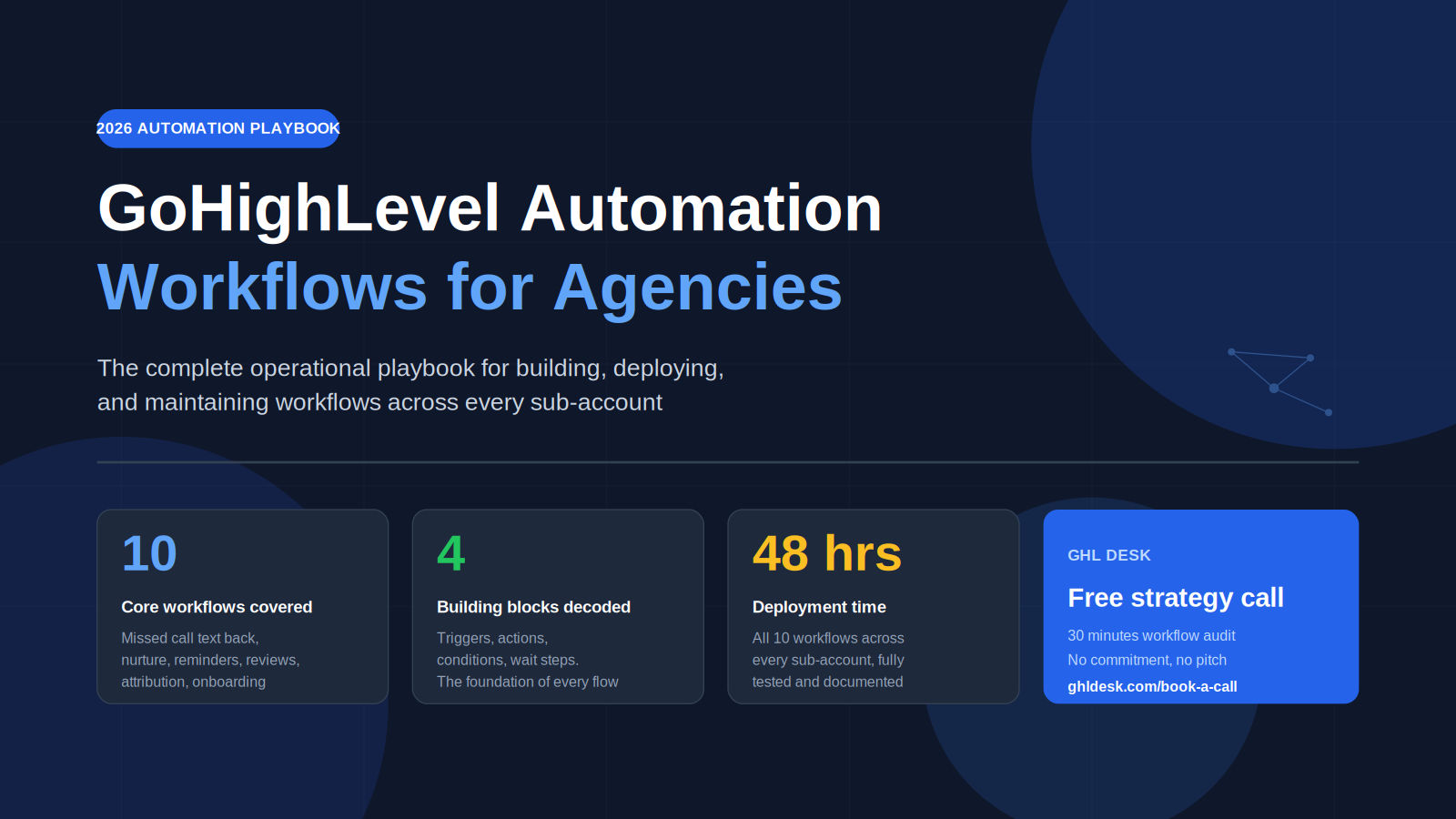
GoHighLevel automation workflows are visual if-this-then-that sequences that run lead nurture, appointment booking, review collection, and client onboarding across every sub-account in your agency. The 10 workflows every GHL agency should have built and deployed in 2026 are missed call text back, lead qualification, multi-channel nurture sequence, appointment reminder, no-show recovery, review request, pipeline stage automation, lead source attribution, client onboarding, and re-engagement for cold leads. The real competitive edge is not building them once, but deploying them cleanly across 10+ sub-accounts with a proper snapshot library and monitoring system. GHL Desk builds, deploys, and maintains automation workflows across agency sub-accounts in 48 hours, so agency owners stop rebuilding the same workflows for every new client.
Most GoHighLevel agencies build the same 5 to 7 automations for every client, from scratch, every time. It is the single biggest time drain in the agency model and the reason fulfillment stops scaling past 10 clients. This guide is not another list of workflow ideas. It is the complete operational playbook for building automation workflows that run cleanly across every sub-account in your agency, tested against real client volume, with the maintenance and deployment layer that 99 percent of agencies skip.
If you are looking for generic workflow templates, there are a hundred blog posts for that. This one is written for agency owners who already know what a trigger is and want to know how to run automation at scale without breaking.
How GoHighLevel Workflows Actually Work
GoHighLevel workflows are visual automation sequences that fire whenever a specific event occurs inside a sub-account. A form gets submitted, a call gets missed, a tag gets applied, a pipeline stage changes, and the workflow runs. The actions inside the workflow can send messages across SMS, email, voice, and webchat, update contact data, move pipeline stages, notify team members, and hand off to external systems through webhooks.
Workflows replaced the older Campaigns system in 2023. The difference matters because Campaigns were linear and single-channel, while workflows are branching, multi-channel, and conditional. Every GoHighLevel plan at every price tier includes the full workflow builder. The Starter plan at $97 per month, the Unlimited plan at $297 per month, and the SaaS Pro plan at $497 per month all give you unlimited workflows per sub-account.
The critical feature for agencies is sub-account portability. You build a workflow once in your agency dashboard, save it inside a snapshot, and deploy that snapshot to every client sub-account in minutes. Done correctly, your snapshot library becomes the single most valuable asset in your agency. Done incorrectly, you end up rebuilding the same 7 workflows from scratch for every new client, which is exactly how agencies stop scaling.
The 4 Building Blocks of Every Workflow
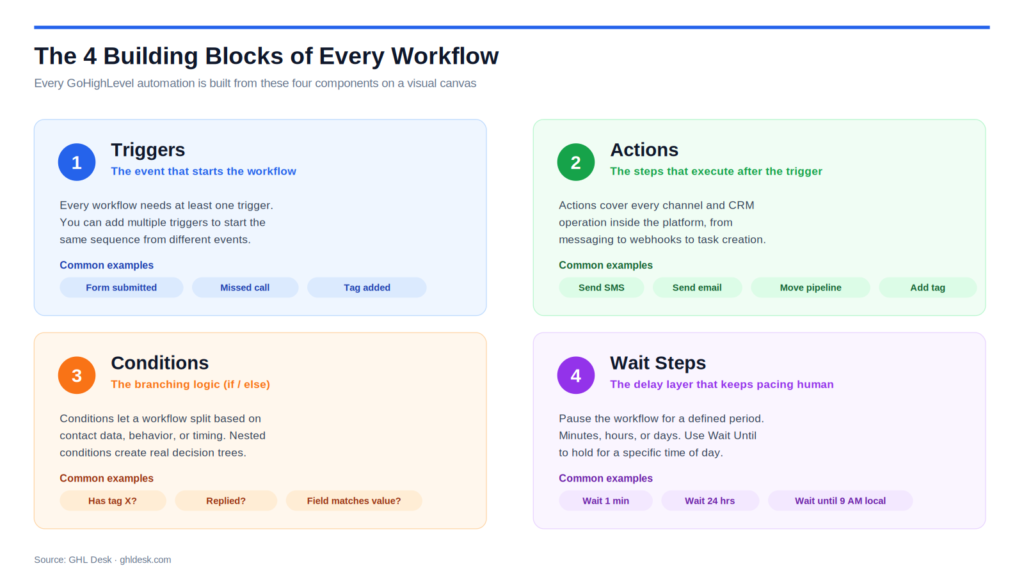
Every GoHighLevel workflow is built from four components. Understanding these is the foundation for everything in this guide.
Triggers. The event that starts the workflow. GoHighLevel supports dozens of trigger types including new form submission, missed call, appointment booked, appointment status changed, tag added, pipeline stage moved, invoice sent, customer replied, and custom webhook triggers. Every workflow needs at least one trigger. You can add multiple triggers to the same workflow if you want different events to kick off the same sequence.
Actions. The steps that execute after the trigger fires. Actions include sending SMS, sending email, adding or removing tags, creating tasks, assigning to a user, updating contact fields, moving pipeline stages, sending webhooks, adding to another workflow, and creating internal notifications. The action library covers every channel and CRM operation inside the platform.
Conditions (If/Else). The branching logic. Conditions let a workflow split based on contact data, behavior, or timing. You can check whether a contact has a specific tag, whether they replied to a message, whether a custom field matches a value, or whether they are currently in another workflow. Nested conditions create the decision trees that separate basic drips from real automation.
Wait Steps. The delay layer. Wait steps pause the workflow for a defined period before the next action fires. You can wait minutes, hours, or days, and you can use Wait Until to hold until a specific time of day or day of the week. Wait steps are what prevent a workflow from feeling robotic and keep message pacing human.
These four components, arranged on a visual canvas, are the building blocks for every single workflow covered in the rest of this guide.
The 10 Automation Workflows Every GHL Agency Needs
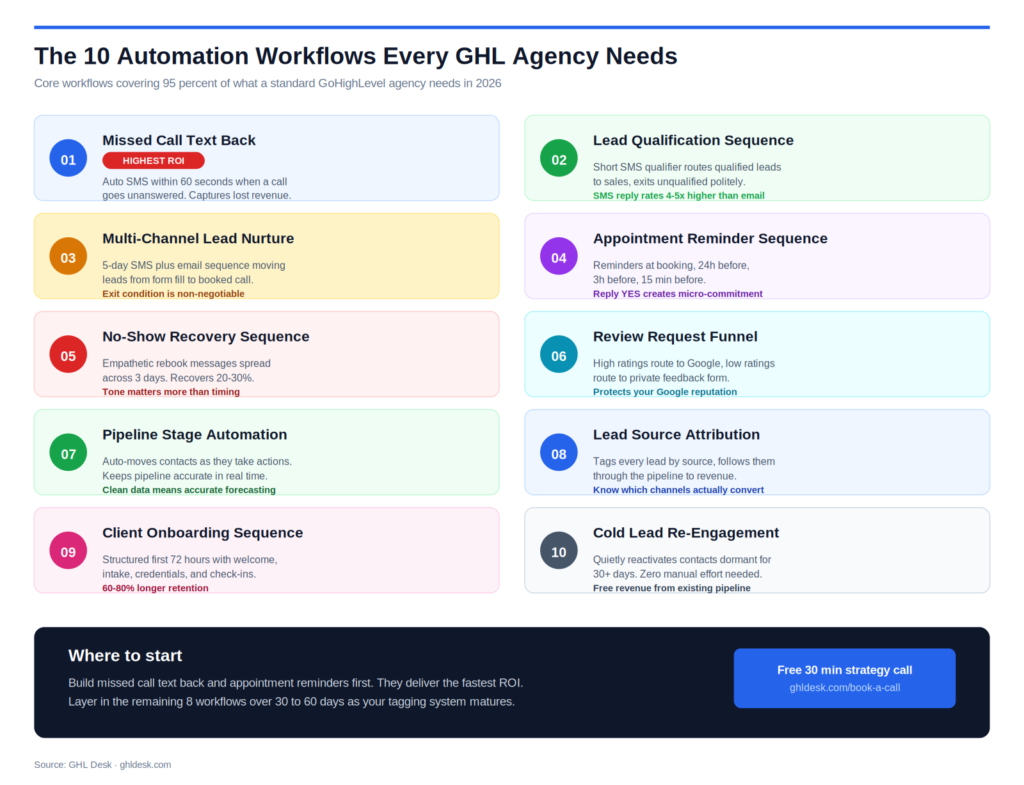
Every GoHighLevel agency in 2026 should have these 10 workflows built, tested, and deployed across every client sub-account. Each one solves a specific revenue or retention problem, and together they cover 95 percent of what a standard GHL agency needs to operate cleanly.
1. Missed Call Text Back
The highest-ROI workflow in the entire GoHighLevel ecosystem. When a call is not answered, an automated SMS reaches the caller within 60 seconds, while they still have their phone in hand.
Trigger: Call status equals Missed Filter: Business hours only (optional) Wait: 1 minute (allows manual callback first) Action: Send SMS with apology plus booking link Secondary Action: Notify assigned team member via internal notification Exit Condition: Callback completed within 60 seconds
The 1-minute wait is the detail most agencies skip. It prevents the automation from firing when your team is about to call back anyway.
2. Lead Qualification Sequence
Screens inbound leads automatically with a short SMS qualification sequence. Qualified leads get tagged and routed to the team. Unqualified leads exit cleanly with a polite message.
Trigger: Form submitted Action: Send qualification SMS with 2 to 3 questions Wait: Until reply received (cap at 24 hours) Condition: If qualified criteria met Yes branch: Add tag “qualified”, notify sales rep, send booking link No branch: Add tag “unqualified”, send exit message, remove from pipeline
The key is using SMS rather than email for qualification because response rates are 4 to 5 times higher.
3. Multi-Channel Lead Nurture Sequence
A structured 5-day sequence that moves new leads from form fill to booked call using SMS and email strategically.
Trigger: Form submitted, tag “New Lead” added Day 0: Instant SMS confirmation Day 1: Value email (educational content, no pitch) Day 2: Case study email (social proof) Day 3: Objection-handling SMS Day 5: Direct CTA email with booking link Exit Condition: Appointment booked, removes from sequence immediately
The exit condition is non-negotiable. Leads who book on day 2 and continue receiving day 3 and day 5 messages hurt your credibility every time.
4. Appointment Reminder Sequence
Cuts no-show rates significantly when built with multiple reminder touchpoints across SMS and email.
Trigger: Appointment booked in GHL calendar Immediate: Confirmation SMS plus email with calendar link 24 hours before: Reminder SMS with reschedule option 3 hours before: Reminder SMS with call link 15 minutes before: Final reminder SMS
Include a Reply YES to confirm in the 24-hour reminder. This creates a micro-commitment that psychologically increases show-up rates.
5. No-Show Recovery Sequence
Recovers 20 to 30 percent of missed appointments when the tone is empathetic and the rebooking link is friction-free.
Trigger: Appointment status changes to No-Show Wait: 1 hour Action: Send empathetic SMS (no guilt, no shame) Wait: 24 hours Condition: If no reply, send rebooking email with direct link Wait: 3 days Action: Send final value-based follow-up Exit Condition: Appointment rebooked
The tone matters more than the timing. Guilt-trip messages push no-shows away. Understanding messages bring them back.
6. Review Request Funnel
Automates review collection at the exact moment client satisfaction is highest, and routes negative sentiment privately before it hits Google.
Trigger: Pipeline stage changes to Completed, or service marked delivered Wait: 2 to 24 hours (fresh but not transactional) Action: Send satisfaction check SMS with 1-to-5 rating Condition: If rating is 4 or 5, route to Google review link Condition: If rating is 1 to 3, route to private feedback form Action: Notify account owner of negative feedback for recovery
The private-feedback branch is what protects your Google reputation. Most agencies skip this step and regret it.
7. Pipeline Stage Automation
Keeps your pipeline accurate in real time by automatically moving contacts as they take actions. Most agencies have pipelines that are out of date by 2 to 4 weeks. This fixes it.
Example A: Form submitted moves contact to New Lead, adds tag “Unqualified” Example B: Appointment scheduled moves to Appointment Set, removes “Unqualified”, adds “Qualified” Example C: Invoice paid moves to Customer, removes from nurture workflows, adds to onboarding
Clean pipeline data means accurate forecasting. Accurate forecasting means you know when to hire, when to push harder, and when to pull back.
8. Lead Source Attribution
Tracks where every lead actually comes from and follows them through the pipeline so you know which channels produce paying customers, not just form fills.
Trigger: Form submitted on source-specific landing page Action: Add source tag (Facebook, Google, Referral, Organic) Action: Add campaign tag for paid sources When invoice paid: Add tag “Customer + [Source]” Weekly: Attribution dashboard shows leads, appointments, and revenue by source
Most agencies spend thousands on ads without knowing which channels actually convert. This workflow ends that.
9. Client Onboarding Sequence
Turns a closed deal into a structured client experience in the first 72 hours, which is the period where retention is most heavily influenced.
Trigger: Opportunity status changes to Won Immediate: Welcome email with next steps 1 hour later: Intake form link via SMS and email Day 1: Credentials delivery and kickoff call booking link Day 2: Team introduction email Day 3: First-week check-in SMS Action: Create internal onboarding task for account manager
Clients onboarded through a structured sequence retain 60 to 80 percent longer than clients with chaotic starts.
10. Re-Engagement for Cold Leads
Quietly attempts to reactivate contacts that have gone cold, without manual effort from your team.
Trigger: Contact has had no activity for 30+ days and remains in pipeline Day 0: Value-based re-engagement email Day 3: SMS if email went unopened Day 7: Direct-question email (yes/no) Condition: If no response, add tag “Unresponsive” and update pipeline Condition: If response, notify sales rep and remove from sequence
Your pipeline has dozens of cold leads that can be reactivated for zero additional acquisition cost. This workflow does it in the background.
Workflow Deployment Strategy Across Sub-Accounts
This is the section that separates agencies that scale from agencies that plateau. Building 10 workflows once is easy. Deploying those 10 workflows cleanly across 25 client sub-accounts, keeping them synced when you update the master version, and tracking performance across all of them is where real operational skill shows up.
Master snapshot architecture. Your agency should maintain a single master snapshot that contains all 10 workflows, plus the pipelines, tags, custom fields, and merge fields those workflows depend on. Every new client sub-account gets this snapshot deployed as the starting point, not rebuilt from scratch. A mature snapshot cuts new client setup time from days to hours.
Niche-specific snapshot variants. If your agency serves multiple verticals, build a master snapshot per niche. A dental clinic snapshot will have different messaging, pipeline stages, and automation timing than a home services snapshot. Generic snapshots are worse than no snapshot because clients immediately notice.
Naming conventions that scale. Every workflow in every sub-account should follow a strict naming pattern. Use Client-Action-Version format, such as Acme-LeadQual-v2 or Metro-ReviewReq-v3. When you manage 20 sub-accounts, you will never find the right workflow in a list of 40 identically named Follow Up automations without a strict naming convention.
Version control. Never edit a live workflow directly. Duplicate it, name the copy with an incremented version number, edit and test the duplicate, and only then swap it in. This gives you a rollback path when something breaks, which it will.
Sub-account copy strategy. GoHighLevel supports copying workflows between sub-accounts directly. For minor adjustments specific to one client, copy from the master snapshot and modify the copy. For global updates that apply to all clients, update the master snapshot and redeploy. Mixing these two paths creates the worst kind of operational mess.
What Kills Workflow Performance at Scale
Understanding how workflows fail at scale is more valuable than knowing how to build them. These are the most common failure modes for agencies running GHL workflows across 10+ sub-accounts.
No exit conditions. Workflows without exit logic keep sending messages to contacts who have already converted. Someone books a call on day 2, then keeps receiving day 3 and day 5 nurture messages telling them to book a call. Every single one of these messages damages credibility.
Workflow overlap. Two automations triggered by the same event creates duplicate messages. A lead fills out a form and gets 5 SMS messages in 10 minutes because three different workflows fired simultaneously. Always map workflow triggers on paper first and check for conflicts before launching.
Missing wait steps. SMS, email, and voicemail drop within the same minute feels like spam and triggers compliance filters. Every outbound action should have appropriate spacing. Minimum 2 to 4 hours between touch points across different channels.
No failure monitoring. Workflows break silently. An SMS fails to deliver because a number is invalid. An email bounces because a domain is blocklisted. A webhook returns a 500 error. Without internal notifications on failure, these issues accumulate for weeks before anyone notices, by which point dozens of leads have been lost.
Dirty tag systems. Tags are the routing logic for every workflow. Inconsistent tagging across sub-accounts means a workflow that works in one client account silently fails in another because the expected tag was never applied. Every tag in your snapshot should be documented and every action that applies or removes a tag should be explicit.
Stale messaging. A workflow that converted well 6 months ago may be underperforming today because the offer changed, the market shifted, or the messaging got tired. Workflows are living systems, not one-time builds. Review quarterly at minimum.
What Makes Workflows Scale Cleanly
Several specific practices reliably separate agencies that manage workflows well from agencies that drown in them.
Strict tagging conventions. Every agency should document its full tag system in a single place. Lead source tags (Source-Facebook, Source-Google, Source-Referral). Status tags (Status-New, Status-Qualified, Status-Customer). Workflow tags (Nurture-Active, Reminder-Sent, Review-Requested). When the tag system is clean, every workflow routes correctly.
Test contacts in every sub-account. Create a dedicated test contact with a real phone number and email you control in every sub-account. Run every new or edited workflow against that contact end-to-end before activating it for real leads. This one habit catches 80 percent of production issues before they affect a client.
Internal failure notifications. Every workflow that sends outbound messages should include a failure notification. Use the internal notification action to alert your team when a key step fails. Without this, broken workflows silently leak leads for days.
Monthly workflow audits. Set a recurring calendar reminder to audit every active workflow at least once per month. Check completion rates, drop-off points, and conversion metrics. Archive workflows no longer in use. This is the single highest-leverage operational task in any GHL agency.
Wait Until Time Window for compliance. Use the Wait Until Time Window action to restrict outgoing SMS to 9 AM to 8 PM local time. This keeps you compliant with TCPA regulations and prevents the occasional 2 AM SMS that destroys client trust instantly.
How to Maintain Workflows Across 25+ Clients
At 25 or more sub-accounts, workflow maintenance becomes a real operational workload. This is the point where most agencies either systemize the maintenance layer or break under the weight of it.
Weekly automation health checks. A dedicated 30 to 60 minute block every week to review workflow performance across all sub-accounts. Which workflows fired the most? Where did the most failures occur? Where are the biggest drop-offs? Most agencies skip this and discover problems when clients complain.
Quarterly messaging refreshes. Every 90 days, refresh the copy on your 5 most active workflows. Messaging that converted well in January may be underperforming in April. This does not need to be a full rewrite, just enough change to keep the sequence feeling current.
Snapshot version management. Every time you update your master snapshot, log the version and the change in a simple changelog. When a client asks why their nurture sequence changed, you have a clear record. When you need to roll back, you have a clear path.
Cross-account reporting. Build a single agency-level dashboard that pulls key workflow metrics from every sub-account. Completion rates, reply rates, no-show recovery rates, review request conversion rates. This is the view that tells you which clients are under-performing and which workflows need attention.
Most agencies cannot handle this maintenance load internally past 15 to 20 clients. At that point, the decision is either hire a dedicated operations person (6-figure salary plus 90 days of training) or outsource the maintenance to a white-label fulfillment partner who handles it across every sub-account continuously.
When to Use N8N Instead of Native GHL Workflows
Native GoHighLevel workflows handle 85 to 90 percent of what a standard agency needs. The remaining 10 to 15 percent usually requires N8N, Make.com, or Zapier because native GHL has limitations on complex multi-step logic, external API integrations, and data transformation.
Use native GHL workflows when: The logic is straightforward if-then-else, actions are all inside GHL, and the data lives in GHL fields.
Use N8N when: The workflow needs complex conditional logic with multiple data sources, you need to transform data before sending to another system, you need to call external APIs mid-workflow, or you need to process large batches of contacts with custom logic.
Common N8N + GHL patterns. Syncing GHL contacts to external CRMs in real time. Pulling data from external sources (ad platforms, review sites, custom databases) and pushing into GHL. Running complex lead scoring based on multiple signals. Building AI-powered qualification flows that use GPT to analyze form submissions before routing.
Most agencies never reach the point where N8N is necessary, but agencies that serve clients with complex stacks or operate in SaaS mode at scale hit this ceiling within 12 to 18 months. The N8N layer is how you break through it.
How GHL Desk Handles Workflow Builds and Deployment
For agencies at any stage, GHL Desk operates as the team that builds, deploys, and maintains workflow infrastructure across your entire sub-account roster. Onboarding for qualifying agencies is 48 hours.
Every engagement starts with a free strategy call, a 30-minute conversation that audits your current workflow setup, identifies the gaps, and maps the 10 core workflows into a snapshot plan specific to your niche.
For qualifying agencies, we build out the master snapshot with all 10 workflows, including the tagging system, pipeline structure, custom fields, merge fields, and failure notifications. We deploy it across every existing sub-account, test each deployment end-to-end, and document the full system for your team.
For agencies running complex stacks, our N8N team builds the hybrid workflows that extend beyond native GHL. For agencies running SaaS mode, our team handles the snapshot library at scale, including version control, cross-account deployment, and quarterly messaging refreshes.
Pricing starts at $150 for a 5-hour pay-as-you-go block for agencies testing the fit, $997/month for a shared team covering ongoing workflow builds and maintenance, and $2,497/month for a dedicated team managing full workflow infrastructure across unlimited sub-accounts. Every plan is white-label by default. Your clients only ever see your brand.
Book a free strategy call at ghldesk.com/book-a-call or view team plans at ghldesk.com/hire-a-team.
.gd-faq{font-family:inherit;max-width:780px;margin:2rem auto} .gd-faq-h{font-size:26px;font-weight:700;color:#111;margin:0 0 1.25rem;padding-bottom:0.75rem;border-bottom:2px solid #2563eb} .gd-item{border:1px solid #e5e7eb;border-radius:10px;margin-bottom:8px;overflow:hidden} .gd-btn{width:100%;background:#fff;border:none;padding:16px 20px;display:flex;justify-content:space-between;align-items:center;cursor:pointer;text-align:left;gap:1rem} .gd-btn:hover{background:#f9fafb} .gd-qt{font-size:15px;font-weight:600;color:#111;line-height:1.4;font-family:inherit} .gd-ic{width:26px;height:26px;border-radius:50%;background:#f3f4f6;border:1px solid #d1d5db;display:flex;align-items:center;justify-content:center;flex-shrink:0;transition:all 0.2s} .gd-ic svg{transition:transform 0.25s ease} .gd-item.open .gd-ic{background:#dbeafe;border-color:#93c5fd} .gd-item.open .gd-ic svg{transform:rotate(45deg)} .gd-body{max-height:0;overflow:hidden;transition:max-height 0.3s ease} .gd-inner{padding:0 20px 16px;border-top:1px solid #f3f4f6} .gd-inner p{font-size:14.5px;color:#4b5563;line-height:1.8;margin:12px 0 0;font-family:inherit} .gd-inner strong{color:#111;font-weight:700} .gd-item.open .gd-body{max-height:600px}Frequently Asked Questions
The 10 core workflows every GHL agency should have are missed call text back, lead qualification, multi-channel nurture, appointment reminders, no-show recovery, review request funnel, pipeline stage automation, lead source attribution, client onboarding, and re-engagement for cold leads. Start with missed call text back and appointment reminders because they deliver the fastest ROI, then layer in the rest over 30 to 60 days.
Most agencies run 10 to 15 active workflows per client sub-account. Building more than 20 usually creates maintenance overhead that outweighs the value. GoHighLevel places no hard limit on workflow count at any pricing tier, so the real limit is operational complexity. Start with the 10 core workflows in this guide and add only workflows that solve a specific measurable problem.
Open the workflow you want to share, click the three-dot menu, and select Copy to Sub-Account. The better approach for agencies managing multiple clients is to save workflows inside a master snapshot and deploy the entire snapshot to new sub-accounts in one click. This copies the workflows plus all supporting pipelines, tags, custom fields, and merge fields at the same time.
With focused time, a skilled GHL specialist can build all 10 core workflows in 2 to 4 days, plus another 3 to 5 days for proper testing, messaging refinement, and sub-account deployment. A complete snapshot build including pipelines, tags, custom fields, and all 10 workflows typically takes 2 to 3 weeks when done correctly for a specific niche.
Missed call text back. It directly captures revenue that would otherwise be lost. A lead that goes to voicemail without follow-up is a lead that calls your competitor within 10 minutes. The workflow takes under an hour to build, deploys to every client immediately, and produces measurable ROI within the first week.
Create a dedicated test contact in every sub-account with a phone number and email you control. Run every new or edited workflow against that contact end-to-end before activating it. Check merge field rendering, timing between steps, conditional branching, and exit conditions. This one habit catches 80 percent of production issues before real leads ever see them.
The only sustainable approach is a master snapshot architecture. Build your 10 core workflows once in a master snapshot, document the tagging system and pipeline structure, and deploy that snapshot to every new sub-account. Use strict naming conventions (Client-Action-Version format) and maintain version control on the master. For global updates, modify the master and redeploy. Managing 20+ sub-accounts without this system is operationally impossible.
Yes. The workflow builder is available on all GoHighLevel plans, including Starter at $97/month. You get the full visual builder with triggers, actions, conditions, and wait steps. The difference between plans is sub-account limits, not workflow functionality. Starter includes limited sub-accounts, Unlimited at $297/month removes the cap, and SaaS Pro at $497/month adds rebilling and white-label SaaS features.
Use N8N when native GHL hits its limits: complex multi-source data logic, real-time sync to external CRMs, data transformation before sending to other systems, large-batch processing, or AI-powered qualification flows using GPT or external APIs. For 85 to 90 percent of standard agency workflows, native GHL is enough. N8N becomes necessary once your agency serves clients with complex tech stacks or operates SaaS mode at 25+ clients.
Use clear tagging and exit conditions on every workflow. Before launching any new workflow, check that no other workflow has the same trigger event. Add a conditional check at the top of each workflow that says “if tag X exists on contact, do not trigger”. Map all workflow triggers on paper first and review for conflicts. The most common overlap is two workflows both firing on Form Submitted and sending duplicate SMS messages.
A white-label fulfillment partner with a mature snapshot library can deploy all 10 core workflows across every client sub-account in 48 to 72 hours, including testing and documentation. Building in-house typically takes 4 to 8 weeks for the same result because it includes hiring, training, and building the snapshot from scratch. GHL Desk’s free strategy call identifies within 30 minutes which workflows are missing from your current setup and how fast they can be deployed.