⚡ Quick Answer
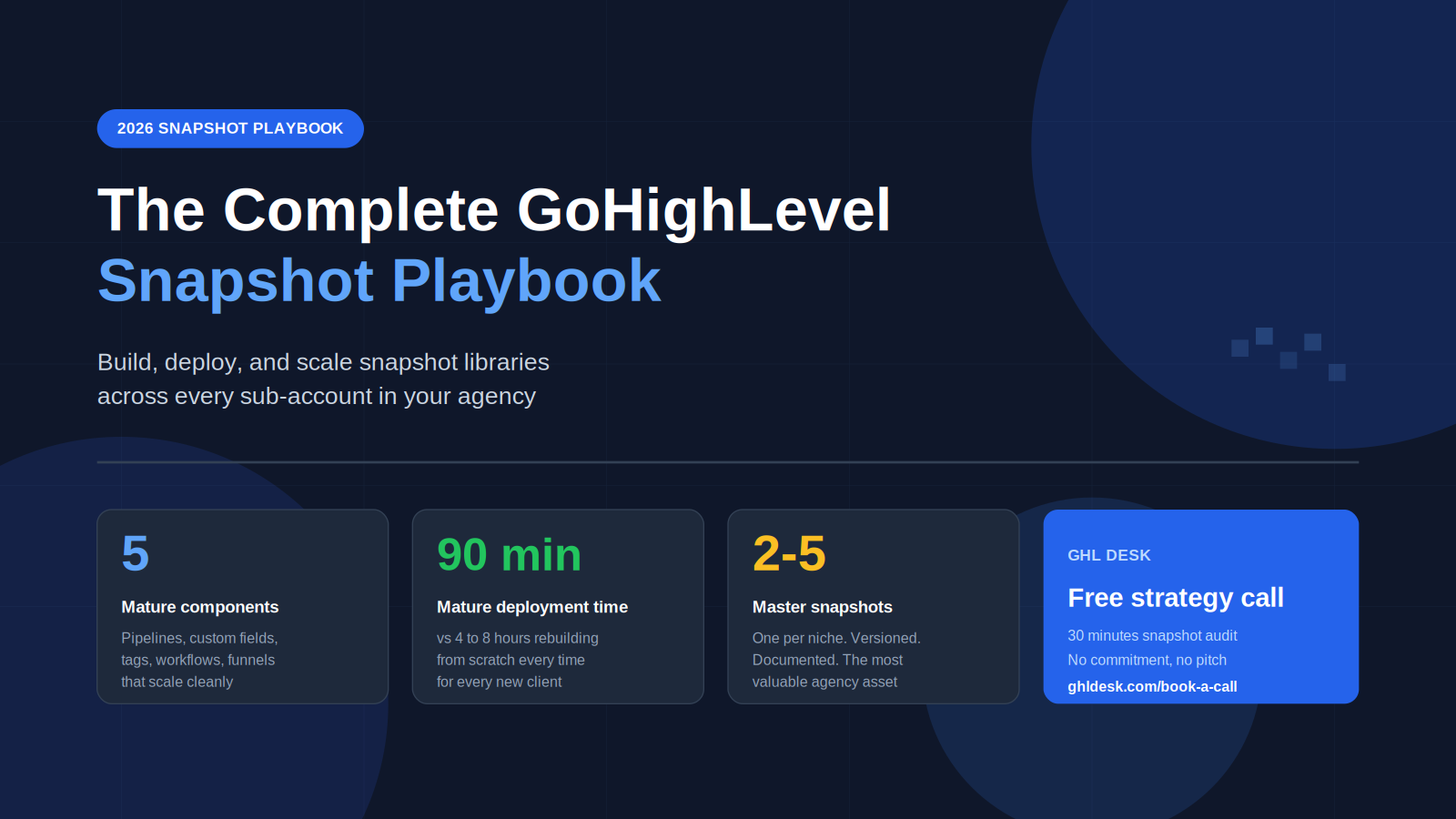
A GoHighLevel snapshot is a complete blueprint of a sub-account that packages workflows, pipelines, custom fields, tags, calendars, funnels, and triggers into a single deployable unit. For agencies, the real value is not the snapshot itself but the master snapshot architecture that lets you deploy a tested system across every new client in 60 to 90 minutes instead of 4 to 8 hours. Mature agencies run 2 to 5 niche-specific master snapshots, version them carefully, audit them monthly, and treat the snapshot library as the single most valuable operational asset in the agency. GHL Desk builds, deploys, and maintains snapshot libraries across agency sub-accounts in 48 hours, so agency owners stop rebuilding the same systems from scratch for every new client.
If you are running a GoHighLevel agency in 2026 and still building every new client from scratch, you are leaving 6 to 8 hours per client on the table. A mature snapshot library turns that into a 60 to 90 minute deployment. The agencies that scale past 25 clients do not work harder than agencies stuck at 10. They have a snapshot system. The ones that plateau do not.
Most articles about GoHighLevel snapshots are written by snapshot stores trying to sell you a product, or affiliate sites listing the best snapshot providers. This one is written from the operational side, by people who deploy and maintain snapshot libraries across hundreds of sub-accounts every week. What follows is the actual playbook for building snapshots that work at scale, deploying them without breaking, and keeping them current as GoHighLevel itself keeps shifting.
What a GoHighLevel Snapshot Actually Is (and What It Is Not)
A GoHighLevel snapshot is a complete blueprint of a sub-account. When you save a snapshot, GHL captures the full configuration of that sub-account, including every workflow, pipeline, opportunity stage, custom field, tag, calendar, form, survey, funnel, website, trigger, email template, and SMS template. You can then deploy that snapshot to any other sub-account, and the entire system rebuilds itself in minutes instead of days.
The official feature lives inside your agency dashboard at Sub-Accounts, then the three-dot menu, then Save as Snapshot. Snapshots are available on every GoHighLevel plan tier, including the Starter plan at $97 per month, the Unlimited plan at $297 per month, and the Agency Pro plan at $497 per month. There is no hard limit on how many snapshots an agency can store.
What a snapshot is not is also worth being clear about. A snapshot is not a backup of contact data. It is not a backup of conversation history. It is not a backup of running workflow executions. It captures the structure of your sub-account, not the live data inside it. This distinction matters because agency owners sometimes assume a snapshot will preserve client conversations or active leads when migrating between accounts. It will not.
A snapshot is also not a one-time creation. Most agencies build a snapshot once, deploy it everywhere, and never touch it again. That is the wrong model. A snapshot is a living asset that needs versioning, monthly audits, quarterly refreshes, and a clear changelog. Without that maintenance discipline, your snapshot library becomes the operational equivalent of legacy code, where everyone is afraid to update it because nobody is sure what will break.
The agencies that win with snapshots in 2026 treat them as software. They version them. They document them. They test new versions before deploying. And they maintain a strict separation between the master snapshot and any client-specific customizations.
The 5 Components Every Mature Snapshot Contains
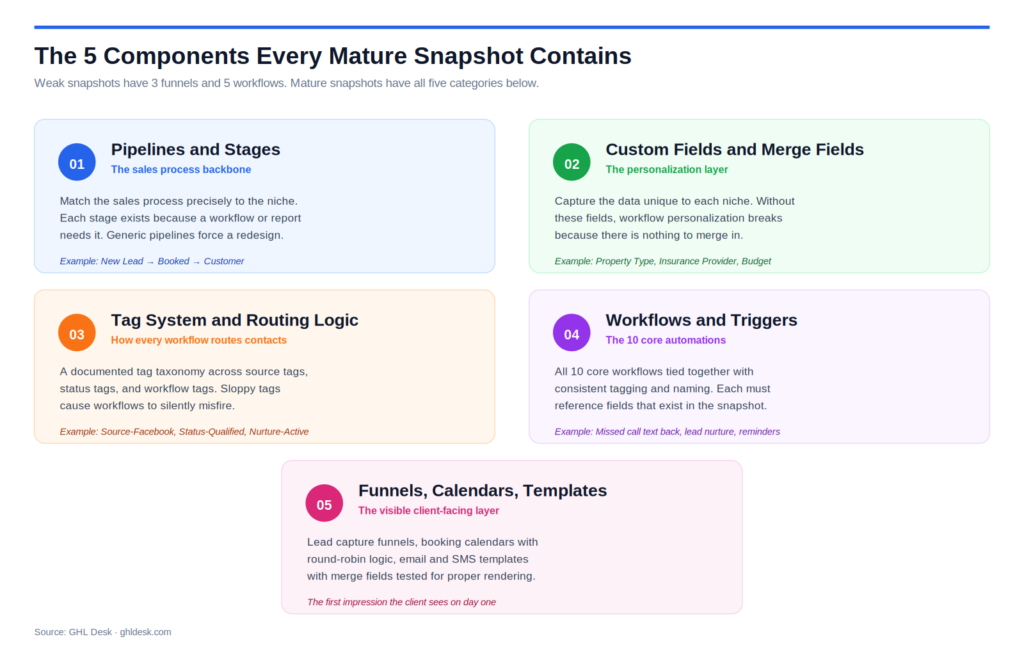
A weak snapshot has 3 funnels and 5 workflows. A mature snapshot has every component a sub-account needs to run cleanly from day one. These are the 5 categories that separate amateur snapshots from professional ones.
Pipelines and opportunity stages. Every niche has a natural sales process, and the pipeline structure should match it precisely. A dental clinic snapshot might have stages of New Lead, Contacted, Consultation Booked, Consultation Completed, Treatment Plan Sent, and Customer. A home services snapshot might use Lead, Quote Requested, Quote Sent, Job Booked, Job Completed, and Customer. Each stage exists because a workflow or report needs it. Generic pipelines force the client to redesign the process, which defeats the purpose of the snapshot.
Custom fields and merge fields. Custom fields capture the data unique to each niche. A real estate snapshot needs Property Type, Budget Range, Timeline, and Pre-Approval Status. A dental snapshot needs Insurance Provider, Last Visit, and Treatment Interest. Without these fields, the personalization in the workflows breaks immediately because there is nothing to merge in. A mature snapshot defines every custom field in advance and references it inside the workflows.
Tag system and routing logic. Tags are how every workflow inside the snapshot routes contacts. A clean snapshot has a documented tag taxonomy: source tags such as Source-Facebook, Source-Google, and Source-Referral, status tags such as Status-New, Status-Qualified, and Status-Customer, and workflow tags such as Nurture-Active, Reminder-Sent, and Review-Requested. When the tag system is consistent, every workflow routes correctly. When tags are sloppy or undocumented, workflows silently misfire.
Workflows and triggers. This is what most agencies focus on, and it is necessary but not sufficient. A complete snapshot includes the 10 core automation workflows every GHL agency should run, tied together with consistent tagging and naming. Missed call text back, lead qualification, multi-channel nurture, appointment reminders, no-show recovery, review request funnel, pipeline stage automation, lead source attribution, client onboarding, and re-engagement for cold leads. Each workflow inside the snapshot must reference custom fields and tags that also exist in the snapshot, or the deployment breaks on first run.
Funnels, calendars, and templates. The visible client-facing layer. Lead capture funnels for the niche, booking calendars with proper buffer times and team round-robin logic, email templates with brand-neutral layouts, and SMS templates with merge fields tested for proper rendering. The funnel and calendar layer is the part the client sees first, and a mature snapshot makes the first impression look professional rather than generic.
A snapshot that includes all 5 component categories deploys cleanly. A snapshot missing any one of them creates rework on every new client, which is exactly the problem the snapshot was supposed to eliminate.
The Master Snapshot Architecture That Scales Past 25 Clients
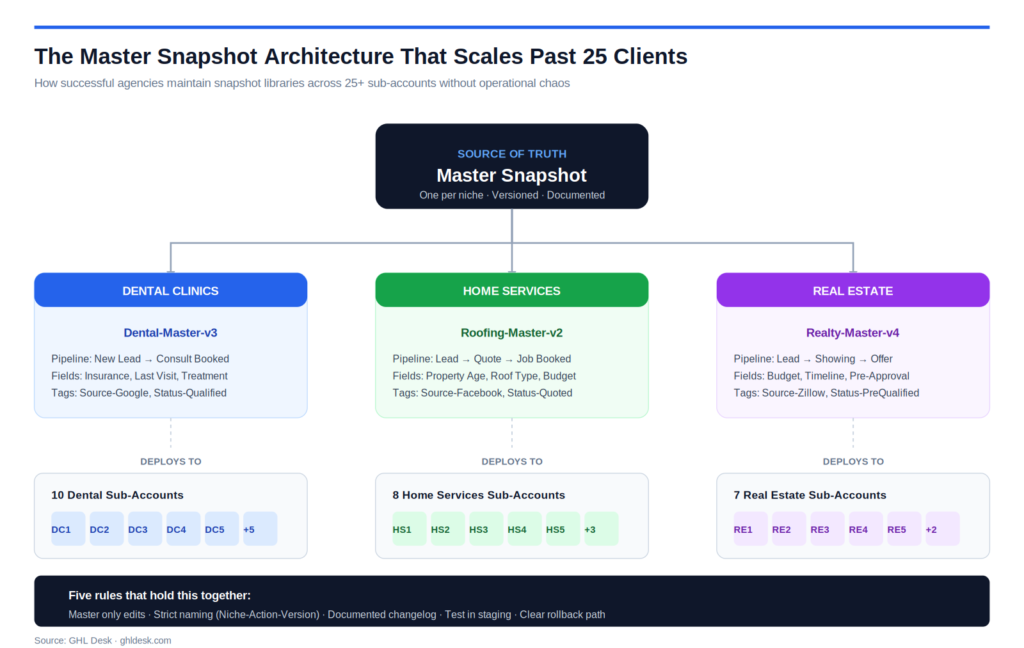
This is the section most snapshot guides skip entirely, and it is the part that decides whether your agency scales past 10 clients or stays stuck there. Building a single snapshot is easy. Maintaining a snapshot library across 25 or 50 sub-accounts, with version control and clean rollback paths, is where real operational discipline shows up.
The master snapshot principle. Your agency should maintain a single master snapshot per niche, not a collection of one-off snapshots that drift apart over time. The master is the source of truth. Every new client gets deployed from the master. Every update to the system happens in the master first, then redeploys to clients. When you have 3 master snapshots covering your 3 main niches, your agency can onboard a new client in any of those niches in under 90 minutes, every single time.
Niche-specific variants. Generic snapshots are worse than no snapshot. A dental clinic and a roofing company share roughly 30 percent of their workflow logic and almost nothing else. Pipeline stages are different. Custom fields are different. Messaging tone is different. Compliance requirements are different. Building one master snapshot per niche means the deployment feels designed for that client rather than retrofitted from a generic template. Most successful GHL agencies in 2026 maintain between 2 and 5 master snapshots, each serving one specific vertical.
Version control discipline. Never edit a live master snapshot directly. Duplicate it, name the copy with an incremented version number such as Dental-Master-v3, edit and test the duplicate, and only then promote it to be the new master. This gives you a rollback path when something breaks in production, which it will. Without version control, a single bad edit can corrupt the master and silently propagate to every new client deployed afterward.
Naming conventions that scale. Every workflow, every pipeline stage, every tag, and every custom field inside a snapshot should follow a strict naming pattern. Most agencies use a Niche-Action-Version format, such as Dental-LeadQual-v2 or Roofing-NoShow-v3. When you manage 25 sub-accounts and need to find one specific workflow, naming conventions are the difference between a 10 second lookup and a 30 minute archeological dig.
Documentation as part of the snapshot. A snapshot that is not documented is a snapshot that breaks the moment a different team member tries to maintain it. Every master snapshot should have a corresponding documentation page that lists every workflow, every tag, every custom field, every pipeline stage, and the logic connecting them. Loom walkthroughs work. A simple Notion page works. Anything documented works better than nothing documented.
Update propagation strategy. When you improve the master, the question is whether to push the update to existing clients or only to new deployments. The answer depends on the change. Bug fixes propagate to all clients. Major messaging refreshes usually go to new clients only, with existing clients on their original version unless the change directly improves their results. Mixing these two paths without a clear rule creates the worst kind of operational mess, where some clients are on v2, some on v3, and nobody can remember which is which.
How to Build Your First Niche-Specific Snapshot
Building a master snapshot from scratch is a 2 to 4 week project when done correctly, and a 2 day rush job when done badly. The agencies that get a return on the investment treat it as a real build, not a side task squeezed between client work.
Step 1: Pick the niche, then talk to 5 real clients in it. Before you touch GoHighLevel, interview 5 actual businesses in the niche you want to template. Ask them how their sales process flows from lead to customer. Ask what data they need to track on each contact. Ask what messaging works and what feels generic. The snapshot you build from real conversations will outperform any snapshot built from assumptions, every time.
Step 2: Map the pipeline on paper first. Draw the opportunity stages from first contact to closed customer. List every action that moves a contact from one stage to the next. Identify which actions can be automated and which require a human touch. This is the document that becomes your pipeline configuration in the snapshot, and skipping it is why so many snapshots feel disconnected from how the business actually runs.
Step 3: Define the custom fields and tag taxonomy. Before building any workflow, write down every custom field the niche needs and every tag the workflows will use. Custom fields capture data, tags drive routing. Get both right at this stage and the workflow logic builds itself. Get either wrong and you will rebuild the snapshot 3 times before it works.
Step 4: Build workflows in order of dependency. Some workflows depend on others. Lead source attribution feeds the multi-channel nurture sequence. Pipeline stage automation feeds the review request funnel. Build the foundation workflows first, test them, then layer in the workflows that depend on them. Building workflows out of order creates broken references that take hours to debug.
Step 5: Build the funnels and calendars last. Funnels and calendars are the most visible part of the snapshot, and they are also the easiest part to rebuild. Build the invisible infrastructure first (workflows, tags, custom fields, pipelines) and the funnel layer becomes a simple finishing step. Building funnels first usually means rebuilding them later when the workflow logic forces design changes.
Step 6: Test against a fake client end-to-end. Create a test sub-account, deploy the snapshot, and run a fake lead through the entire system from form fill to customer closed. Use a real phone number and a real email address you control. Watch every message arrive. Check every tag applied. Verify every pipeline stage moves correctly. This is where 80 percent of production issues surface, and catching them here is free.
Step 7: Document everything before deploying to a real client. Write the documentation page. Record the Loom walkthrough. List the version number. Note any known limitations. The 90 minutes spent on documentation saves 30 hours of confusion later when someone else needs to maintain the snapshot.
A master snapshot built this way will deploy cleanly to your first 10 clients in the niche without significant rework. A master snapshot rushed in 2 days will create rework on every single deployment, and the cumulative cost will exceed the cost of a proper build by month 2.
How to Deploy Snapshots Across Sub-Accounts Without Breaking Them
The deployment phase is where most snapshot work fails silently. The build looks good in your test account. The deployment to a real client introduces edge cases the test account never surfaced. These are the deployment practices that separate clean handoffs from messy ones.
Deploy to a fresh sub-account, never an existing one. Snapshots overlay onto whatever already exists in the target sub-account, and that overlay rarely behaves the way you expect. If a tag with the same name already exists, behavior is unpredictable. If a workflow with the same trigger already exists, both will fire and create duplicate messages. The clean path is always: create a new sub-account, deploy the snapshot, then migrate any existing data afterward.
Verify A2P 10DLC registration before activating SMS workflows. Every snapshot that includes SMS workflows hits the A2P 10DLC compliance layer in 2026. The snapshot itself does not register the brand or campaign. That registration happens at the sub-account level and takes 1 to 5 business days. Activating SMS workflows before A2P approval results in messages failing silently and leads being lost. Always check A2P status before turning on any SMS-dependent workflow.
Replace placeholder copy with client-specific content. A snapshot ships with placeholder copy that needs to be replaced before the workflows are activated. Client business name, contact details, scheduling links, branding tokens, and any merge fields specific to the client. The fastest way to do this is a structured intake form that captures every variable before deployment, then a checklist that updates each placeholder in order.
Connect integrations sub-account by sub-account. Snapshots cannot transfer integration credentials. Each sub-account needs its own Stripe connection, its own Twilio numbers, its own Mailgun domain, its own Google Calendar OAuth, and its own Facebook ad account permissions. Skipping this step means the workflows fire correctly but cannot deliver messages or process payments.
Run the test contact end-to-end after every deployment. Same test contact discipline as the build phase. Create a test contact in the freshly deployed sub-account, run a fake lead through the whole system, and verify every message arrives correctly. This catches deployment-specific issues like missing API keys, wrong sender phone numbers, or unmapped custom fields. 30 minutes of testing saves 30 days of broken automations going unnoticed.
Document the deployment, not just the snapshot. Each client deployment should have a deployment record listing the snapshot version used, the date deployed, any client-specific customizations made, and the integration credentials configured. When something breaks in month 6, this record is what makes troubleshooting possible.
The deployment phase is also the part most agencies try to delegate to junior staff or freelancers, and it is the part where the cost of cutting corners shows up loudest. Invest the time on the first 3 deployments per master snapshot, refine the deployment checklist, and only then hand it off to someone else.
What Kills Snapshot Performance at Scale
Understanding how snapshots fail at scale is more useful than knowing how to build them. These are the most common failure modes for agencies running snapshot libraries across 15 or more clients.
Drift between deployed clients and the master. Each client gets small customizations after deployment. A new tag added here, a workflow tweak there, a custom field renamed somewhere else. Over 6 months, every client’s sub-account looks slightly different from the master, and the master no longer reflects what is actually running in production. This is the single biggest failure mode in snapshot management. The fix is a strict rule: client-specific customizations stay in client sub-accounts, and the master only reflects changes intended for all future deployments.
Custom fields that exist in the snapshot but not in the workflows that use them. A workflow merge tag references a custom field, but the field was renamed or deleted in a snapshot update. The workflow fires, the merge tag returns blank, and the SMS goes out reading “Hi {{contact.first_name}}, thanks for booking with {{custom_values.business_name}}”. Clients see this immediately and lose trust. Every snapshot update should include a field-by-field reference check before deployment.
Tags that workflows depend on but never get applied. A workflow checks for the tag Status-Qualified before firing the next sequence. The tag is never applied because the upstream workflow that should apply it has a bug. The downstream sequence never runs, leads never get the follow-up, and the agency never notices because the workflow technically did not fail. The fix is end-to-end testing on every snapshot version, not just unit testing per workflow.
Snapshot updates that break existing client deployments. An agency improves the master snapshot, redeploys to existing clients, and breaks something that was working before. Custom fields get duplicated, pipeline stages get renamed, tags get reorganized. Every redeployment to an existing sub-account carries this risk. The fix is to redeploy carefully, test in a staging sub-account first, and have a rollback path documented before pushing the update.
Performance degradation from accumulated junk. Every workflow that runs leaves traces. Every contact that flows through fills custom fields. Every test that gets run creates junk data. Over time, sub-accounts deployed from a snapshot accumulate clutter that slows reporting and confuses team members. The fix is a quarterly cleanup pass that removes test contacts, archives unused tags, and consolidates redundant workflows.
Compliance changes that invalidate active workflows. A2P 10DLC rules tightened in 2026. SMS opt-in language requirements changed. Some snapshots built in 2024 and 2025 now contain workflows that would trigger compliance flags if activated today. The fix is a quarterly compliance audit on every active master snapshot, with updates pushed to all client deployments running that master.
The agencies that hit 25 sub-accounts and stop scaling are almost always the ones that did not address these failure modes early. The agencies that scale past 50 treat them as standard operational hygiene.
Buy vs Build vs Outsource: The Honest Decision Framework
Most snapshot guides push you toward buying a pre-built snapshot from a marketplace. That is sometimes the right answer and often not. The right call depends on your stage, your niche, your client volume, and whether you have the operational capacity to maintain what you buy.
Buy a pre-built snapshot when the niche is mainstream (real estate, dental, fitness, home services), your client volume is below 5, you do not yet have the technical depth to build from scratch, and you are willing to accept that the snapshot will look identical to other agencies using the same product. Pre-built snapshots typically cost between $97 and $997, install in under 60 minutes, and serve as a working starting point. The major limitations are generic messaging, lack of niche specificity, no ongoing customization, and the fact that updates depend entirely on the seller.
Build your own master snapshot when you have 5 or more clients in the same niche, you have the operational capacity to invest 2 to 4 weeks in the build, you want a system that reflects your specific agency methodology, and you are committed to maintaining it long-term. The investment is significant. The payoff compounds. Every client built from your own master snapshot is faster than the last, and the snapshot becomes a real competitive moat after 12 to 18 months of refinement.
Outsource the snapshot build to a specialist when you have the demand for niche snapshots but not the time or technical depth to build them yourself, you want a professional system without the in-house overhead, or you need multiple niche snapshots built in parallel. A specialist team typically delivers a complete master snapshot in 2 to 3 weeks, including pipeline design, custom field architecture, tag taxonomy, all 10 core workflows, funnels, calendars, templates, and full documentation. The cost is meaningfully higher than a marketplace snapshot but lower than building in-house, and the quality is significantly above either alternative.
The decision is rarely binary. Most mature agencies use a hybrid model: a pre-built snapshot for niches they serve casually, a custom-built or outsourced master snapshot for niches they specialize in, and ongoing maintenance handled by a fulfillment partner so the owner never touches the system after deployment.
The wrong move is paying for a marketplace snapshot, customizing it heavily, and ending up with a Frankenstein system that nobody can maintain. If you customize a bought snapshot beyond cosmetic changes, you have effectively built your own snapshot with extra steps. At that point, building from scratch or outsourcing the build is the cleaner path.
The Snapshot Maintenance Load Most Agencies Underestimate
Building the snapshot is the visible part of the work. Maintaining it across a growing client base is the invisible part, and it is the part most agencies underestimate by a factor of 3 to 5.
Monthly audits. Every active master snapshot needs a 60 to 90 minute audit per month. Check completion rates on key workflows. Identify drop-off points. Verify tag application accuracy. Check merge field rendering across recent SMS and email sends. Most agencies skip this, and most agencies discover problems weeks or months after they started.
Quarterly messaging refreshes. Workflows that converted well in January often underperform by April. Markets shift, offers change, and messaging gets tired. Every 90 days, refresh the copy on the 5 most active workflows in each master snapshot. This does not need to be a complete rewrite, just enough change to keep messaging current.
Compliance updates. GoHighLevel pushes platform updates regularly, and some of those updates affect how workflows behave. A2P 10DLC rules change. SMS opt-in language requirements shift. New conversation AI features launch. Carrier filtering rules tighten. Every quarter brings 2 to 5 changes that may affect active workflows. Without a maintenance process, these changes silently degrade performance until the agency notices through complaints.
Snapshot version management. Every change to a master snapshot creates a new version. Every version needs a changelog entry, a documentation update, and a deployment record. Without this discipline, agencies end up with 4 different versions of “the dental snapshot” running across clients, and nobody can remember which sub-account is on which version.
Cross-account performance reporting. A mature agency tracks workflow performance across all sub-accounts running the same master snapshot. Which workflows are firing successfully? Where are the highest drop-off rates? Which clients have the strongest no-show recovery? This view is what tells you when a master snapshot needs an update and when the issue is client-specific.
The maintenance load for one master snapshot across 10 to 15 sub-accounts is roughly 8 to 12 hours per month of focused operational work. For 25 sub-accounts, it climbs to 15 to 25 hours per month. For 50 sub-accounts, it becomes a part-time job by itself. Most agencies cannot absorb this load internally past 15 clients without either hiring a dedicated operations specialist or outsourcing the maintenance to a specialist team.
This is the work that does not show up on sales calls and does not appear in the original snapshot price. It is also the work that determines whether your snapshot library remains a competitive asset or becomes the operational debt that limits your growth.
When N8N + Snapshot Hybrids Replace Native GHL
Native GoHighLevel snapshots handle 85 to 90 percent of what an agency needs. For the remaining 10 to 15 percent, the answer is N8N or a similar automation platform layered on top of the snapshot.
Use a native snapshot when all the logic stays inside GHL, the data lives in GHL custom fields, and the workflow operates on a single contact at a time. Most lead nurture, appointment booking, review collection, and client onboarding sequences fit cleanly inside native snapshots.
Layer N8N on top of the snapshot when the workflow needs to pull data from external sources before processing, transform data before sending it to another system, run AI analysis on form submissions, sync GHL contacts in real time to an external CRM, or process large batches of contacts with custom logic. N8N is also the cleaner choice for any workflow that needs to call multiple external APIs in sequence.
Common hybrid patterns in 2026. Real-time sync of GHL contacts to a separate database for advanced reporting. AI-powered lead scoring using GPT to analyze form responses before assigning a tag. Cross-platform attribution that pulls data from Facebook Ads, Google Ads, and Google Analytics into a unified view inside GHL. Compliance workflows that handle GDPR or HIPAA requirements that native GHL cannot satisfy alone.
Architecture notes. When building a hybrid, the snapshot remains the source of truth for sub-account configuration. N8N handles the external logic and writes results back to GHL through the API or webhooks. This keeps the master snapshot clean and replicable across sub-accounts, while the N8N layer extends specific clients without polluting the snapshot itself.
Most agencies do not need N8N for their first 10 clients. By client 20, the limits of native GHL start to show, and the hybrid model becomes the only path forward without abandoning GHL entirely. Agencies that hit this stage and try to brute-force everything inside native GHL usually break their snapshot library in the process.
How GHL Desk Builds and Maintains Snapshot Libraries
For agency owners running 5 or more clients, GHL Desk operates as the team that builds, deploys, and maintains the entire snapshot library. Onboarding for qualifying agencies is 48 hours, not weeks.
Every engagement starts with a free strategy call, a 30-minute conversation that audits your current snapshot situation, identifies the niches you serve most, and maps the master snapshot architecture your agency actually needs. If we are not the right fit, we tell you that directly.
For qualifying agencies, we build the master snapshot from the ground up, including pipeline design, custom field architecture, tag taxonomy, all 10 core workflows, funnels, calendars, templates, A2P 10DLC compliance setup, and full documentation. We deploy the snapshot to every existing sub-account, test each deployment end-to-end, and document the version history.
For agencies running multiple niches, we build separate master snapshots per vertical. For agencies running SaaS mode, we handle the snapshot library at scale across hundreds of sub-accounts, including version control and quarterly refreshes. For agencies running hybrid workflows that extend beyond native GHL, our N8N team handles the integration layer.
Snapshot maintenance is included in our monthly team plans. Monthly audits, quarterly messaging refreshes, compliance updates, version management, and cross-account performance reporting all run continuously without the agency owner managing any of it.
Pricing starts at $150 for a 5-hour pay-as-you-go block for agencies testing the partnership, $997 per month for a shared team handling ongoing snapshot work, and $2,497 per month for a dedicated team managing full snapshot infrastructure across unlimited sub-accounts. Every plan is white-label by default. Your clients only ever see your brand.
If your agency is stuck rebuilding the same systems for every new client, book a free strategy call and we will map out exactly what your snapshot library should look like. The same call also clarifies whether the outsourced fulfillment model fits your stage, or whether one of the three scaling levers is the bigger leverage point right now.
.gd-faq{font-family:inherit;max-width:780px;margin:2rem auto} .gd-faq-h{font-size:26px;font-weight:700;color:#111;margin:0 0 1.25rem;padding-bottom:0.75rem;border-bottom:2px solid #2563eb} .gd-item{border:1px solid #e5e7eb;border-radius:10px;margin-bottom:8px;overflow:hidden} .gd-btn{width:100%;background:#fff;border:none;padding:16px 20px;display:flex;justify-content:space-between;align-items:center;cursor:pointer;text-align:left;gap:1rem} .gd-btn:hover{background:#f9fafb} .gd-qt{font-size:15px;font-weight:600;color:#111;line-height:1.4;font-family:inherit} .gd-ic{width:26px;height:26px;border-radius:50%;background:#f3f4f6;border:1px solid #d1d5db;display:flex;align-items:center;justify-content:center;flex-shrink:0;transition:all 0.2s} .gd-ic svg{transition:transform 0.25s ease} .gd-item.open .gd-ic{background:#dbeafe;border-color:#93c5fd} .gd-item.open .gd-ic svg{transform:rotate(45deg)} .gd-body{max-height:0;overflow:hidden;transition:max-height 0.3s ease} .gd-inner{padding:0 20px 16px;border-top:1px solid #f3f4f6} .gd-inner p{font-size:14.5px;color:#4b5563;line-height:1.8;margin:12px 0 0;font-family:inherit} .gd-inner strong{color:#111;font-weight:700} .gd-item.open .gd-body{max-height:600px}Frequently Asked Questions
A GoHighLevel snapshot is a complete blueprint of a sub-account that captures every workflow, pipeline, custom field, tag, calendar, funnel, form, and template into a single deployable unit. You can save a snapshot from any sub-account and deploy it to a new sub-account, rebuilding the entire system structure in minutes instead of days. It captures configuration, not live data, so contacts and conversations do not transfer.
A complete niche-specific master snapshot built correctly takes 2 to 4 weeks. This includes pipeline design, custom field architecture, tag taxonomy, all 10 core workflows, funnels, calendars, templates, and full documentation. A rushed 2-day snapshot exists, but it creates rework on every deployment and costs more in cumulative time than the proper build would have. Specialist teams typically deliver a complete snapshot in 2 to 3 weeks.
Most successful GHL agencies in 2026 maintain 2 to 5 master snapshots, with one master per niche or vertical. Generic snapshots that try to serve every industry are worse than no snapshot because they force customization on every deployment. Specialized agencies serving one or two verticals often run with just 1 to 2 master snapshots and reach scale faster than generalist agencies running 7 or 8 weak snapshots.
Buy a pre-built snapshot when you have fewer than 5 clients in the niche, the niche is mainstream, and you need a working starting point fast. Build your own when you have 5 or more clients in the same vertical, you want messaging that reflects your agency methodology, and you are committed to long-term maintenance. The wrong move is buying a snapshot and customizing it heavily, which creates a Frankenstein system that nobody can maintain.
Always deploy to a fresh sub-account, never an existing one. Open your agency dashboard, go to Sub-Accounts, click the three-dot menu on the target sub-account, and select Load Snapshot. Choose your master snapshot from the library and confirm. After deployment, replace placeholder copy with client-specific content, connect integrations like Stripe and Twilio, verify A2P 10DLC registration before activating SMS workflows, and run a test contact end-to-end before going live.
No. A snapshot captures the structure of a sub-account, not the live data inside it. Contacts, conversation history, running workflow executions, and integration credentials do not transfer with a snapshot. If you need to migrate live data between sub-accounts, that requires a separate import process using CSV exports for contacts and dedicated data migration for conversations.
Run a monthly audit on every active master snapshot, with a deeper quarterly refresh of messaging on the 5 most-used workflows. Compliance updates (especially A2P 10DLC) need attention every quarter. Major rebuilds happen when GoHighLevel ships platform changes that affect workflow behavior, which usually occurs 1 to 2 times per year. Snapshots without maintenance silently degrade within 6 to 9 months.
A sub-account is the live environment where one client’s CRM, workflows, contacts, and operations actually run. A snapshot is a saved blueprint of a sub-account that can be deployed to create new sub-accounts. Sub-accounts are operational. Snapshots are templates. Every client your agency serves has their own sub-account, but a single master snapshot can be deployed across dozens of sub-accounts.
Yes. After deployment, the sub-account is fully editable and you can adjust workflows, funnels, messaging, branding, and any other component. The discipline that matters is keeping client-specific customizations inside the client sub-account, not in the master snapshot. The master should only reflect changes intended for all future deployments. Mixing client customizations into the master is the most common cause of snapshot drift.
Never edit a live master snapshot directly. Duplicate the master, increment the version number (such as Dental-Master-v3), test the duplicate in a staging sub-account, and only then promote it to be the new master. Maintain a simple changelog with every version listing what changed and why. This gives you a rollback path when something breaks, which it will. Without version control, a single bad edit corrupts the master and propagates to every future deployment.
A niche-specific snapshot is built for one vertical, with pipeline stages, custom fields, tag taxonomy, and messaging tuned to how that industry actually operates. A dental clinic snapshot is structurally different from a roofing snapshot in every meaningful way beyond surface branding. Niche snapshots feel designed for the client. Generic snapshots feel retrofitted, and clients notice immediately. Most successful GHL agencies in 2026 run niche-specific snapshots rather than one universal template.
A specialist white-label fulfillment partner with mature snapshot infrastructure typically delivers a complete niche-specific master snapshot in 2 to 3 weeks, including documentation, version control setup, and deployment to existing sub-accounts. Building in-house typically takes 6 to 10 weeks because it includes hiring, training, and ramping. GHL Desk’s free strategy call identifies within 30 minutes which master snapshots your agency actually needs and how fast they can be built.