⚡ Quick Answer
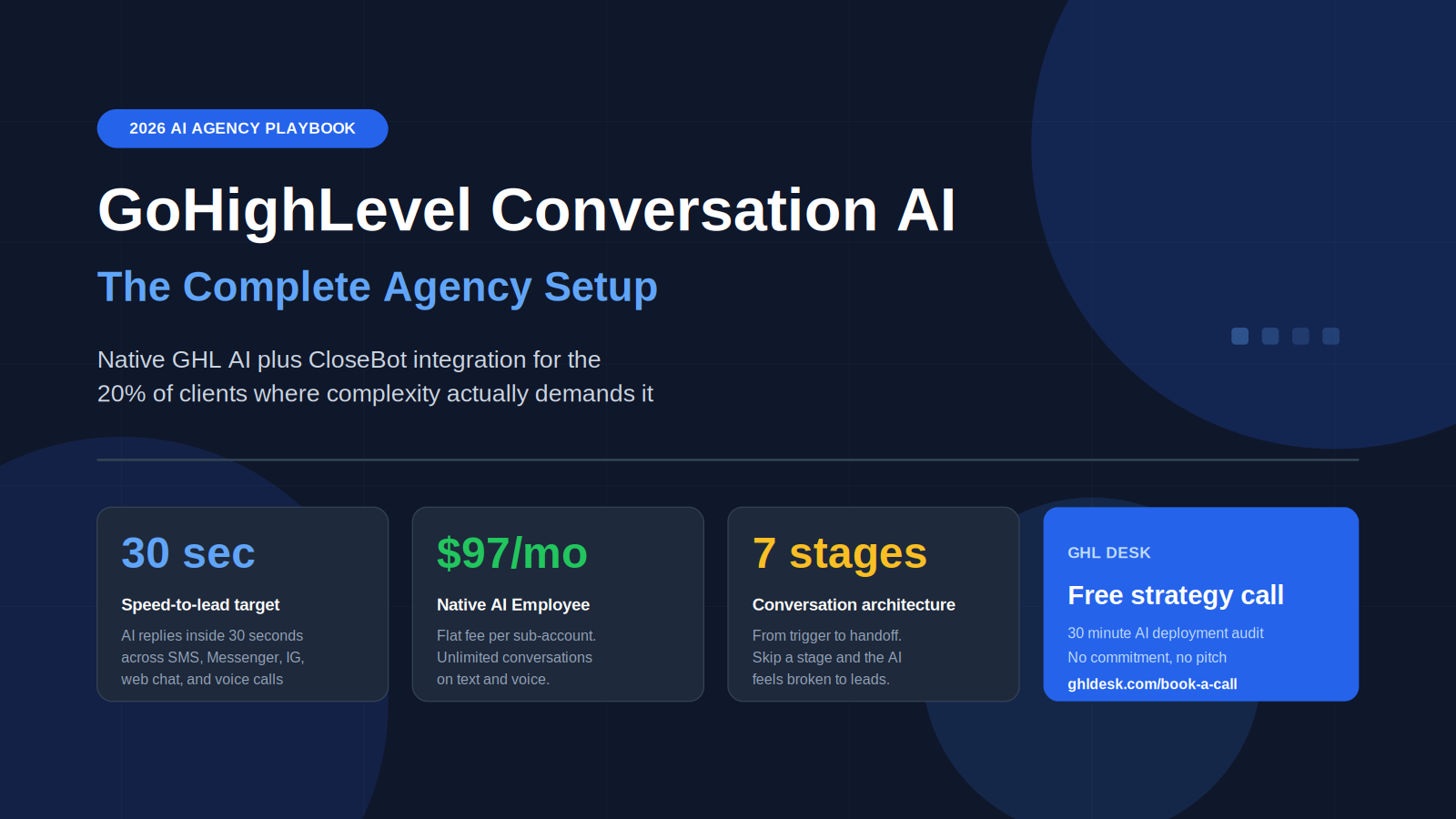
A correctly configured GoHighLevel Conversation AI setup replies to inbound leads within 30 seconds, qualifies them through 3 to 5 natural questions, books appointments directly into the calendar, and hands off to humans only when escalation is genuinely needed. The native GHL AI Employee add-on costs $97/month per sub-account and handles 85 to 90 percent of typical agency client use cases. For complex qualification logic, branching conversations, or industry-specific compliance language, layering CloseBot AI on top of GHL produces a more capable system at the cost of additional configuration. The agencies that deploy AI well in 2026 do not pick native vs CloseBot — they pick based on the client’s use case. GHL Desk handles full Conversation AI deployment, prompt engineering, and ongoing AI training across agency sub-accounts in 48-hour onboarding.
If you are running a GoHighLevel agency in 2026 and have not deployed Conversation AI across your client base, you are losing leads inside the first 5 minutes after they opt in. Speed-to-lead matters more than message quality in most niches, and AI handles speed at a level no human team can match. The agencies that ship AI well are growing client outcomes by 40 to 70 percent on the same ad spend. The ones that ignore it are watching client churn climb.
Most articles about GoHighLevel Conversation AI cover the basic setup: turn it on, add a prompt, point it at a calendar. That gets you to a 50 percent working configuration. What follows is the complete agency playbook covering the architecture decisions, prompt engineering, knowledge base structure, human handoff logic, native vs CloseBot trade-offs, and the operational discipline required to run AI across multiple client sub-accounts without it embarrassing your agency.
What GoHighLevel Conversation AI Actually Is in 2026
GoHighLevel Conversation AI is the platform’s built-in AI assistant that handles inbound messages across SMS, Facebook Messenger, Instagram DM, web chat, and (with Voice AI) phone calls. It reads incoming messages, generates responses based on the configured prompt and knowledge base, and takes actions inside the CRM such as applying tags, moving pipeline stages, and booking appointments.
The 2026 release shipped two major improvements over earlier versions. The Knowledge Source feature lets you upload documents, FAQs, and structured content that the AI references when responding, dramatically reducing hallucinations and generic responses. The Workflow AI integration lets Conversation AI fire inside automated workflows as a node, which means you can trigger AI responses based on form submissions, pipeline changes, or any other workflow event.
The AI runs on a combination of GPT-5 Mini and Claude Sonnet under the hood, with GHL selecting the model based on the conversation type. Response latency typically sits between 400 and 900 milliseconds for text and under 600 milliseconds for voice with the latest infrastructure. This is well within the threshold where conversations feel natural rather than robotic.
What Conversation AI is not is a replacement for thoughtful sales conversations. It handles the top 70 to 80 percent of interactions: qualifying, answering common questions, booking, and routing. The remaining 20 to 30 percent (objection handling, edge cases, complex negotiations, sensitive situations) still benefits from a human in the loop, and the agencies that try to automate everything usually produce worse outcomes than the agencies that automate selectively.
The competitive advantage AI provides in 2026 is not better conversations than humans. It is faster, more consistent conversations than humans, available 24/7, across every channel simultaneously. A human SDR handling 100 inbound leads per day misses some, takes 30 minutes to respond to others, and qualifies inconsistently. Conversation AI handles all 100 within 30 seconds each, asks the same qualification questions every time, and never has a bad day.
Native Conversation AI vs CloseBot: The Honest Comparison
This is the comparison most agency owners need clarity on, and most existing content is either biased toward native (written by GHL affiliates) or biased toward CloseBot (written by CloseBot affiliates). Here is the honest version.
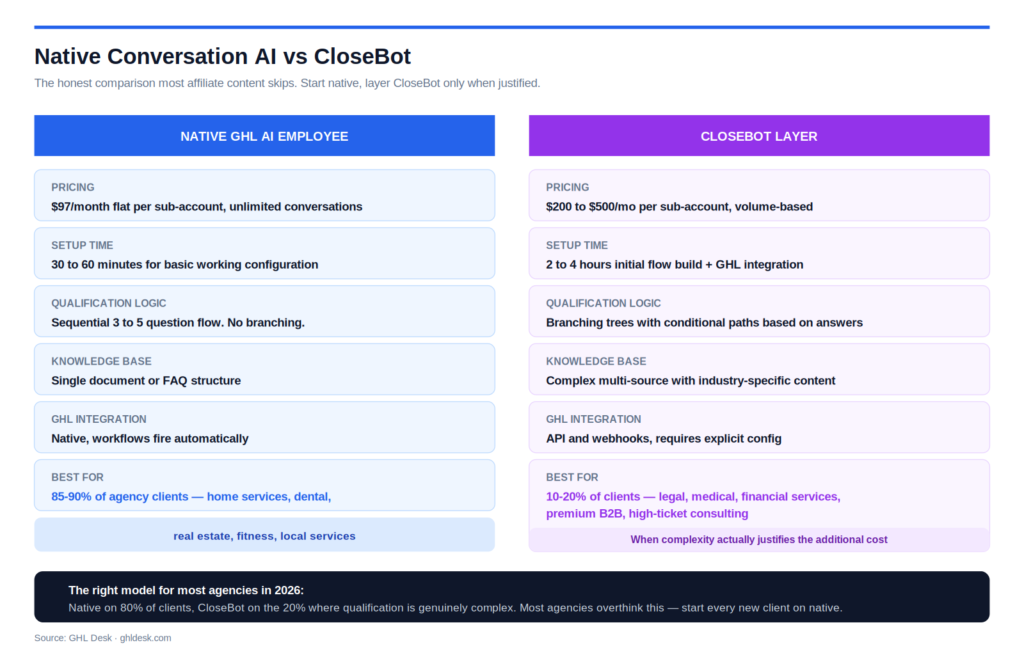
Native GHL Conversation AI works best when the qualification logic is straightforward (3 to 5 sequential questions), the knowledge base fits inside a single document or FAQ structure, the conversation lives inside GHL channels exclusively, and the cost discipline matters (native is $97/month flat per sub-account regardless of volume). For 85 to 90 percent of typical agency clients (home services, dental, real estate, fitness, local services), native handles the use case fully.
CloseBot works better when the qualification logic includes branching paths (different questions based on earlier answers), the conversation needs to integrate with external tools beyond GHL, the agency needs visual flow design to build complex conversation trees, or the client requires more sophisticated prompt control than the native interface exposes. CloseBot is particularly strong for high-ticket services (legal, financial, premium B2B) where qualification gets nuanced and the cost of a bad conversation is high.
Cost comparison. Native is $97/month flat per sub-account, unlimited conversations. CloseBot pricing is volume-based, starting around $97/month for low-volume use and scaling up based on conversation volume and features used. For agencies with high message volume (1000+ conversations per month per client), native is significantly cheaper at scale. For agencies with low-volume but complex conversations, CloseBot’s premium features often justify the additional cost.
Configuration complexity. Native ships ready to use in 30 to 60 minutes of basic configuration. CloseBot requires 2 to 4 hours of initial setup to build the conversation flow visually, plus integration setup to connect it back to GHL. The trade-off is that CloseBot’s visual builder makes complex flows much easier to maintain than native’s prompt-based approach.
Integration depth. Native is deeply integrated with GHL workflows, pipelines, tags, and custom fields. Actions inside the conversation fire workflows automatically without configuration. CloseBot integrates with GHL through API and webhooks, which requires explicit configuration but allows for more granular control over what happens when.
The right model for most agencies. Native for 80 to 90 percent of client sub-accounts. CloseBot for the 10 to 20 percent of clients where qualification is genuinely complex or the use case justifies the additional sophistication. Trying to use only one or the other for every client usually produces compromise outcomes in one direction or the other.
Most agencies overthink this decision. The right path is to start every new client on native, evaluate after 60 days whether the conversation quality meets the bar, and upgrade to CloseBot only when there is a clear gap that native cannot fill.
The 7-Stage Architecture Every Conversation AI Setup Needs
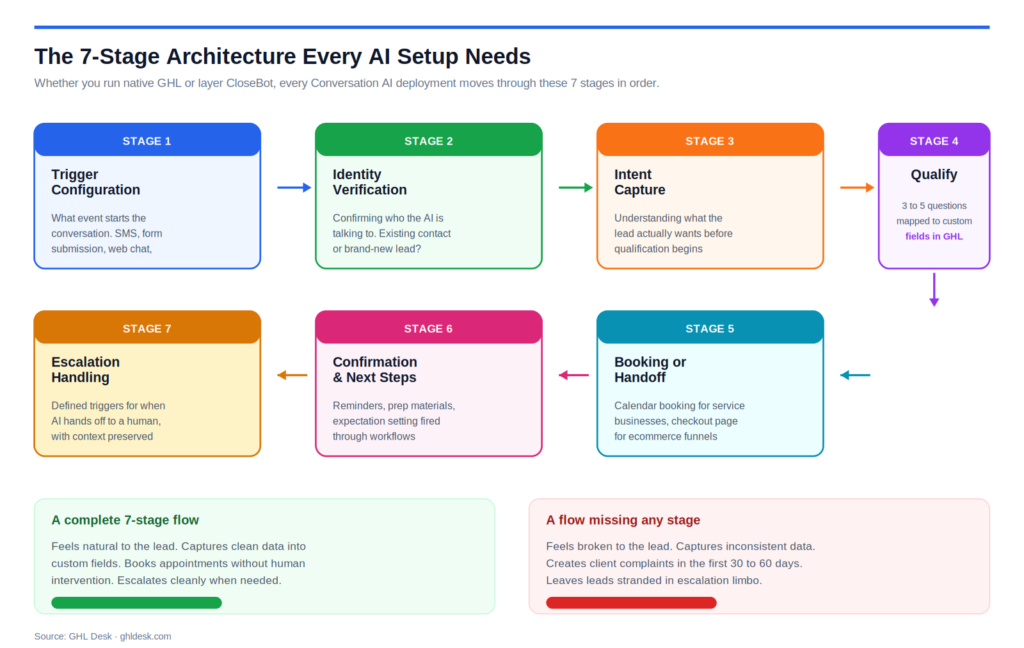
Whether running native or CloseBot, every Conversation AI deployment moves through 7 architectural stages. Skipping a stage or rearranging them creates the bugs that show up later as customer complaints.
Stage 1: Trigger configuration. What event starts the conversation. New SMS inbound, form submission, Facebook Messenger message, web chat open, phone call answered. Each trigger needs its own configuration because the conversation context differs. A lead replying to a cold outbound SMS needs a different opener than a lead filling out a discovery form.
Stage 2: Identity verification. Confirming who the AI is talking to. Existing contact in the CRM (use their first name, reference recent interactions) or new lead (introduce the business, set context). Skipping this stage creates the worst kind of AI experience where the bot greets a returning customer like a stranger or asks a brand-new lead questions it should already know.
Stage 3: Intent capture. Understanding what the lead actually wants. Most agencies skip this and jump straight to qualification, which feels pushy. A short intent question (“What brings you in today?” or “What can I help with?”) collects the context that makes everything downstream feel natural rather than scripted.
Stage 4: Qualification. The 3 to 5 questions that separate worth-pursuing leads from not-worth-pursuing ones. Budget, timeline, decision-maker status, geographic fit, specific need. Each question maps to a custom field in GHL so the answers persist beyond the conversation. The agencies that deploy AI well in 2026 spend most of their prompt engineering effort here.
Stage 5: Booking or handoff. What happens once a lead is qualified. For most service businesses, this is offering a calendar booking. For complex sales, it might be tagging for human follow-up. For ecommerce, it might be pointing to a checkout page. The action taken in this stage is what determines the funnel conversion rate downstream.
Stage 6: Confirmation and next steps. What the lead receives after booking or completing the conversation. Confirmation message, appointment reminders, prep materials, what to expect on the call. This is the appointment confirmation and reminder layer that should fire automatically through workflows, not manually through AI.
Stage 7: Escalation handling. What happens when the AI cannot answer or when the lead asks for a human. Clear escalation triggers, defined handoff messages, notification to the right team member, context preservation so the human picks up where AI left off. The escalation stage is where most agencies fail their clients, leaving leads stranded mid-conversation.
A conversation flowing through all 7 stages feels natural. A conversation missing any one stage feels broken to the lead and shows up as a complaint to the client within 30 to 60 days of launch.
How to Set Up Native GHL Conversation AI, Step by Step
The actual setup inside GoHighLevel takes 45 to 90 minutes for the first time and 20 to 30 minutes once you have a process. The sequence below produces a working configuration on the first attempt.
Step 1: Enable the AI Employee add-on. Inside the sub-account, navigate to AI Employee. Activate the add-on at $97/month. Allow 2 to 5 minutes for activation. Until activated, none of the AI configuration options appear in the interface.
Step 2: Configure the AI assistant persona. Inside AI Settings, set the assistant name (often the business name or a persona name like “Sarah from Acme Dental”), the tone (professional, friendly, casual, formal), and the conversation style (concise, conversational, detailed). The persona settings shape every response the AI generates, so getting them right at the start saves significant prompt rewriting later.
Step 3: Build the knowledge base. Inside Knowledge Source, upload the documents the AI should reference when answering questions. Business hours, services, pricing, location, common policies, frequently asked questions. The knowledge base is what prevents the AI from making up answers when it does not know something. Structured content (FAQ format) works better than long prose documents.
Step 4: Write the system prompt. The system prompt is the master instruction that tells the AI how to behave. Start with the role (who the AI is and who it works for), then the objective (what the AI should accomplish in conversations), then the qualification questions in order, then the escalation triggers (when to hand off to a human). Most agencies write prompts that are too long. Aim for 300 to 600 words maximum.
Step 5: Configure the trigger channels. Inside the Channels tab, enable the channels the AI should handle: SMS, Facebook Messenger, Instagram DM, web chat, Voice AI for phone calls. Each channel can have slightly different prompt instructions if the conversation style varies, but most agencies use the same core prompt across channels.
Step 6: Set up custom field mappings. When the AI captures information during qualification, it needs to write that data to the right custom fields. Inside the AI settings, map qualification questions to their corresponding custom fields (budget question maps to the Budget field, timeline question maps to the Timeline field, etc). Without this mapping, captured data goes into conversation history but never appears in reporting or workflows.
Step 7: Configure escalation triggers. Define the conditions that move the conversation from AI to human. Common triggers include the lead asking explicitly for a human, the AI failing to answer a question 2 times in a row, the lead expressing strong negative sentiment, or specific keyword triggers (complaint, refund, urgent). Each trigger should notify the right team member and pause the AI on that conversation.
Step 8: Connect to the calendar. If the AI should book appointments, connect the appropriate calendar inside the AI settings. The AI can offer available slots, confirm the booking, and add the contact’s information to the appointment automatically. Calendar routing rules (round-robin, single user, team-based) apply as configured at the calendar level.
Step 9: Test the conversation flow end-to-end. Open the test conversation tool inside the AI settings. Run through a complete fake conversation as a lead would experience it. Verify that the AI asks the right questions in the right order, captures data correctly into custom fields, handles edge cases gracefully, and escalates when it should. The test tool surfaces 70 to 80 percent of configuration issues before any real lead encounters them.
Step 10: Roll out gradually with active monitoring. Do not enable AI on 100 percent of inbound conversations on day one. Start with 25 to 50 percent of traffic for the first week while monitoring conversation logs daily. Look for patterns where the AI got confused, made up answers, or missed escalation triggers. Adjust the prompt and knowledge base based on real conversation data. Expand to 100 percent only after the first week shows clean conversation quality.
A setup completed through these 10 steps produces working Conversation AI ready to handle real leads. A setup that skips the testing and gradual rollout phases usually creates a customer service problem in the first week.
When and How to Layer CloseBot on Top of GHL
For the 10 to 20 percent of client situations where native is not enough, layering CloseBot produces a more capable system. The integration is straightforward once you understand the architecture.
The signal CloseBot is the right choice. Conversations have branching logic based on earlier answers. Knowledge base content is large, complex, or industry-specific (legal, medical, financial services). Qualification needs to integrate with external tools (CRM enrichment APIs, AI scoring services, custom data sources). Visual conversation design matters because the flow gets edited frequently. The client requires sophisticated A/B testing of conversation paths.
Architecture overview. CloseBot runs the conversation logic externally and writes results back to GHL through webhooks. The lead messages your GHL number or web chat, GHL forwards the message to CloseBot, CloseBot processes the response and decides what to do, then sends the reply back to GHL which delivers it through the original channel. The lead never knows CloseBot exists. Everything happens behind the scenes.
Setup sequence. Create the CloseBot account and connect it to your GHL sub-account through the official integration. Build the conversation flow inside CloseBot’s visual builder, mapping each conversation step to actions in GHL (apply tag, update field, change pipeline stage, book appointment). Configure the webhook endpoints that pass messages between CloseBot and GHL. Test the round-trip latency to ensure the conversation feels responsive (typically 800 to 1500 milliseconds for the full loop).
Prompt engineering inside CloseBot. Each node in the conversation flow has its own prompt, which means you can write specific instructions for specific conversation moments rather than one master prompt covering everything. This granular control is what makes CloseBot suitable for complex conversations. The trade-off is that each prompt needs to be written and maintained.
Integration with GHL workflows. CloseBot completion events trigger GHL workflows through webhooks. When a lead completes qualification, books an appointment, or escalates to human, CloseBot fires the appropriate webhook and GHL workflows take over from there. This is where the GHL workflow library becomes the operational backbone of the entire system.
Cost management. CloseBot pricing scales with conversation volume and feature usage. Most agencies running CloseBot for high-value clients see costs of $200 to $500 per sub-account per month when including all features used. Compared to native at $97/month, the additional cost only makes sense when the conversation complexity actually requires it.
Maintenance load. CloseBot flows need updating as the business evolves, similar to GHL prompts. The visual builder makes updates easier but does not eliminate them. Plan on 1 to 2 hours per month per active CloseBot deployment for prompt refinements, flow adjustments, and integration maintenance.
The right model for most agencies running both: native on 80 percent of clients, CloseBot on the 20 percent where complexity justifies it, with the agency or fulfillment partner handling both under one operational umbrella.
Prompt Engineering That Actually Works for Agency Clients
Most agencies write Conversation AI prompts that produce mediocre conversations because they treat the prompt as a settings configuration rather than as the AI’s instruction manual. The agencies that produce great AI conversations treat prompt engineering as a real discipline.
The structure that works. A working prompt has 4 sections in order: identity (who the AI is, who it works for, what tone it uses), objective (what the conversation should accomplish), behavior rules (what the AI should and should not do), and qualification flow (the questions to ask in order). This structure gives the AI clear context before it starts generating responses.
Identity section. “You are Sarah, the virtual assistant for Acme Dental in Phoenix, Arizona. You speak professionally but warmly, like a knowledgeable office manager who is genuinely interested in helping. You use the patient’s name when known. You never claim to be human if asked directly.” This grounds the AI’s persona in specifics, which produces more consistent responses than vague tone descriptors.
Objective section. “Your goal is to qualify inbound leads for new patient consultations and book them into the calendar. Qualified leads are adults living within 30 minutes of Phoenix, looking for general dentistry or cosmetic services, who can attend during weekday business hours.” Specific, measurable, actionable. Avoid vague objectives like “be helpful” or “have a great conversation.”
Behavior rules section. “Never quote specific prices for services. Never make medical claims about treatments. Never promise outcomes. If asked about insurance, confirm we accept most major plans and offer to verify their specific coverage during the consultation. If the lead is asking about an existing appointment, hand off to a human immediately.” Rules prevent the most common AI failure modes (hallucinated pricing, false promises, mishandled escalations).
Qualification flow section. Write the qualification questions as numbered steps with conditional logic. “1. Ask what type of dental service they are interested in. 2. If cosmetic, ask if they have a specific procedure in mind. 3. Ask if they currently have a dentist they are leaving or if this is their first dental search in a while. 4. Ask if they prefer mornings, afternoons, or evenings. 5. Offer 3 available appointment slots that match their preference.”
The 600-word rule. Prompts longer than 600 words start producing inconsistent responses because the AI loses focus across the instruction set. If your prompt is approaching 800 words, the right move is usually to split the conversation into multiple AI nodes (which native handles through workflow AI and CloseBot handles natively).
Iterative refinement. No prompt works perfectly on first deployment. Plan to review the first 50 conversations after launch, identify failure patterns, and refine the prompt 2 to 4 times in the first month. After the initial refinement period, prompt edits become rare (1 to 2 times per quarter) for most clients.
Voice prompts vs text prompts. Voice AI requires slightly different prompt structure than text AI. Shorter sentences. Verbal pauses indicated with commas. No formatting that does not translate to speech. Most agencies maintain separate prompts for voice and text rather than trying to share one across both.
The prompts that produce winning conversations look more like written instructions to a human assistant than like settings configuration. The mental model shift from “configuring AI” to “training an assistant” is what separates good prompt engineering from bad.
Knowledge Base Structure That Prevents Hallucinations
The knowledge base is what prevents the AI from making up answers when it does not know something. Most agencies underinvest in the knowledge base and then wonder why the AI gives wrong answers to common questions.
What belongs in the knowledge base. Business hours, service descriptions, pricing information (if appropriate to share publicly), location and contact information, common policies (cancellation, refund, scheduling), frequently asked questions, key staff information, insurance or payment methods accepted, geographic service area, and any other information clients ask about regularly.
Format matters more than length. A 50-page PDF with all the information dumped in works worse than a 5-page structured FAQ document. The AI parses structured content better than unstructured prose. Use clear headings, short paragraphs, question-and-answer format where possible, and consistent terminology throughout.
Update discipline. Knowledge bases go stale faster than most agencies expect. Business hours change for holidays. Pricing gets adjusted. New services get added. Policies change. A knowledge base update cadence of monthly works for stable businesses. Higher-velocity businesses need weekly or biweekly reviews.
What to leave out. Information the AI should not share with leads (internal pricing, profit margins, staff personal details, competitor information). Anything sensitive or confidential. Speculative content (predictions about waiting times, availability that changes hourly). Information that would be embarrassing if quoted in a screenshot to a customer.
Multi-document strategy. For complex businesses, structure the knowledge base across multiple documents organized by topic: services document, policies document, FAQ document, location and contact document. The AI references whichever is most relevant to each question. This structure scales better than one massive document.
Testing knowledge base coverage. Run the AI through 30 to 50 representative questions a real lead would ask. Identify the questions the AI cannot answer correctly. Add the missing information to the knowledge base. Repeat until 95 percent of test questions produce correct responses. This is the single highest-leverage activity for AI quality.
Hallucination prevention. Even with a strong knowledge base, AI sometimes makes up information when it does not know an answer. The fix is explicit instruction in the prompt: “If you do not know the answer to a question, say ‘Let me have someone from our team get back to you on that specific question’ rather than guessing.” This single rule eliminates most hallucination complaints.
A well-structured knowledge base reduces escalation volume by 40 to 60 percent because the AI answers more questions correctly without needing human help. A weak knowledge base produces escalations that should never have been escalations.
Human Handoff: The Logic Most Agencies Get Wrong
The handoff from AI to human is the single most important moment in the entire Conversation AI architecture. Get it right and the AI feels like a great team member. Get it wrong and the AI feels like a frustrating obstacle.
When the AI should hand off. Lead asks explicitly for a human (“can I talk to a real person?”). AI cannot answer a question after 2 attempts. Lead expresses strong frustration or negative sentiment. Lead asks about something outside the AI’s scope (complaint, refund, billing dispute). Lead’s situation requires judgment the AI cannot reliably make. Conversation is taking longer than expected without progressing.
The handoff mechanics. When a trigger fires, the AI sends a brief handoff message (“Let me get someone from our team to help with this. They will reply shortly.”), pauses itself on that specific conversation, applies a tag to notify the team, and creates a task or notification for the right team member. The human picks up the conversation with full context already loaded.
The notification layer. Without proper notifications, handoffs sit in queue indefinitely. The notification should reach the right person on the right channel within 30 seconds. Slack notifications work for most teams. SMS notifications work for after-hours coverage. Email notifications are too slow for live handoffs. Multiple notification channels for the same handoff prevent missed escalations.
Business hours vs after hours. During business hours, handoff to a live human. After hours, handoff to a “we will get back to you first thing tomorrow” message with an explicit time commitment. Letting the AI pretend a human will respond at 2 AM creates worse outcomes than honestly setting next-business-day expectations.
Context preservation. When a human picks up the conversation, they should see the full AI conversation history above the chat thread. They should not have to ask the lead to repeat what they already told the AI. Native GHL handles this automatically. CloseBot requires explicit configuration to pass context.
The handoff message itself. Avoid “I do not understand” or “I cannot help with that.” These feel like the AI is rejecting the lead. Better phrasing: “That is a great question for our team — let me get the right person to help you with that. They will reach out in just a few minutes.” The handoff should feel like the AI is helping, not failing.
Re-engagement after handoff. Once the human resolves the issue, decide whether the AI should resume the conversation or whether the human should continue. For most use cases, the human continues until the immediate issue is resolved, then the AI resumes for follow-up sequences. Explicit rules prevent the handoff from creating a permanent disconnect.
The handoff layer is operationally where most AI deployments leak conversion. The AI catches 80 percent of conversations cleanly, the handoff layer fumbles the remaining 20 percent, and the agency notices the problem only when client complaints arrive. Building the handoff right at launch prevents this entirely.
What Kills Conversation AI Performance at Scale
Understanding how AI fails at scale is more useful than knowing how to build it. These are the failure modes that surface across agencies running AI on 10 or more client sub-accounts.
Drift between prompt and business reality. The business adds new services, changes pricing, updates policies, but the AI prompt and knowledge base stay frozen at the original launch state. Within 6 months, the AI is confidently telling leads incorrect information. The fix is quarterly audit cycles where someone compares current business reality against current AI configuration.
Workflow misfires after AI actions. The AI books an appointment, but the confirmation workflow does not fire because of a tag mismatch. The AI qualifies a lead, but the lead source attribution breaks because the custom field was renamed. AI sits on top of workflow infrastructure, and when workflows break, AI actions silently fail downstream.
Conversations that never end. AI sometimes gets stuck in loops where it keeps asking variations of the same question or fails to recognize when a conversation is complete. Without explicit conversation completion triggers (booked appointment, escalation, lead disengagement), leads bounce off mid-conversation and never return.
Escalation queue overwhelm. When escalation volume exceeds the team’s capacity to respond, leads wait too long for human follow-up, lose trust, and disengage. The fix is monitoring escalation volume daily and either expanding the team or tightening AI rules to handle more conversations without escalation.
Knowledge base bloat. Agencies keep adding to the knowledge base without removing outdated content. Over 12 to 18 months, the knowledge base accumulates contradictions, outdated policies, and stale information. The AI starts giving inconsistent answers because it is referencing conflicting source material. Quarterly knowledge base cleanups prevent this.
Compliance drift. A2P 10DLC rules, SMS opt-out language requirements, healthcare HIPAA requirements, and financial services regulations evolve. AI prompts written in early 2025 may now contain language that creates compliance risk. Compliance audits on AI configurations should happen quarterly.
Voice AI specific failures. Voice AI degrades faster than text AI because audio quality, latency, and natural conversation flow are harder to maintain. Voice configurations need monthly testing because phone network conditions, voice model updates, and prompt drift all affect quality more dramatically than text.
Cross-client prompt contamination. Agencies running AI across many clients sometimes accidentally cross-pollinate prompts (Dental Client A’s prompt logic gets copied to Roofing Client B without proper adaptation). The result is AI that uses dental terminology with roofing clients or vice versa. Strict niche separation in prompt templates prevents this.
The agencies that scale AI well treat it as an operational system requiring ongoing maintenance, similar to snapshot libraries. The agencies that deploy AI as a one-time setup and walk away usually discover problems through client complaints rather than through proactive monitoring.
How GHL Desk Deploys AI Across Client Sub-Accounts
For agency owners running 5 or more clients, GHL Desk handles the full Conversation AI deployment lifecycle: setup, prompt engineering, knowledge base development, CloseBot integration when needed, and ongoing maintenance across sub-accounts. Onboarding for qualifying agencies is 48 hours, not weeks.
Every engagement starts with a free strategy call, a 30-minute conversation that audits your current AI situation across client sub-accounts, identifies which clients need native vs CloseBot, and maps the prompt engineering work required. If we are not the right fit, we tell you that directly.
For qualifying agencies, we build the complete AI deployment: persona configuration, system prompt engineering, knowledge base development, channel configuration, custom field mappings, escalation logic, calendar integration, workflow triggers, and end-to-end testing. We deploy across existing client sub-accounts in 3 to 5 business days per client.
For clients requiring CloseBot, our team builds the visual conversation flow, configures the GHL integration, sets up webhook routing, and manages the additional configuration complexity that CloseBot introduces. The agency owner never has to choose between native and CloseBot personally — we make the recommendation based on the specific client use case.
For agencies running SaaS Mode at scale, we handle AI deployment as part of the standard sub-account provisioning so every new client launches with working AI from day one. For agencies running hybrid systems with N8N or custom integrations, our team handles the AI layer that connects to the broader automation stack.
Ongoing AI maintenance is included in our monthly team plans. Quarterly prompt audits, knowledge base updates, escalation queue monitoring, voice AI quality checks, and compliance reviews all run continuously without the agency owner managing any of it.
Pricing starts at $150 for a 5-hour pay-as-you-go block for agencies testing the partnership, $997 per month for a shared team handling ongoing AI work, and $2,497 per month for a dedicated team managing full AI infrastructure across unlimited sub-accounts. Every plan is white-label by default. Your clients only ever see your brand.
If your agency is running AI inconsistently across clients, or planning to launch Conversation AI and wants the operational discipline built in from the start, book a free strategy call and we will map exactly what your AI deployment should look like. The same call covers whether outsourced fulfillment is the right fit for your stage or whether scaling levers other than AI deserve attention first.
Frequently Asked Questions
GoHighLevel Conversation AI is the platform’s built-in AI assistant that handles inbound messages across SMS, Facebook Messenger, Instagram DM, web chat, and Voice AI phone calls. It reads incoming messages, generates responses based on the configured prompt and knowledge base, and takes actions inside the CRM such as applying tags, moving pipeline stages, and booking appointments. It runs on GPT-5 Mini and Claude Sonnet models with typical response latency of 400 to 900 milliseconds.
The native AI Employee add-on costs $97/month per sub-account and includes unlimited Conversation AI usage, Voice AI, and all related features. This is significantly cheaper than per-message or per-minute pricing for custom API builds, especially at higher conversation volumes. The flat-fee structure makes the cost predictable regardless of how many conversations the AI handles each month.
For 85 to 90 percent of typical agency clients, native GHL Conversation AI handles the use case fully. CloseBot makes sense when conversations have branching logic based on earlier answers, knowledge bases are complex or industry-specific (legal, medical, financial services), the agency needs visual flow design for complex conversation trees, or qualification requires sophisticated prompt control beyond what the native interface exposes. The right model for most agencies is native on 80 percent of clients and CloseBot on the 20 percent where complexity justifies the additional cost.
A complete native Conversation AI setup takes 45 to 90 minutes the first time and 20 to 30 minutes once you have a documented process. This includes persona configuration, knowledge base upload, system prompt writing, channel setup, custom field mappings, escalation triggers, calendar integration, and end-to-end testing. CloseBot integrations add 2 to 4 hours of additional setup for the visual flow design and webhook configuration. Specialist teams with mature templates deploy AI across new clients in 3 to 5 business days.
Yes. Once a calendar is connected inside the AI settings, the AI can offer available time slots, confirm the booking, and add the lead’s information to the appointment automatically. Calendar routing rules (round-robin, single user, team-based) apply as configured at the calendar level. The AI also fires the appointment confirmation workflow automatically, which then handles reminders, prep materials, and any other post-booking sequences.
Build a structured knowledge base with business hours, services, pricing, policies, and FAQs in question-and-answer format. Add an explicit prompt rule: “If you do not know the answer to a question, say ‘Let me have someone from our team get back to you on that specific question’ rather than guessing.” Test the AI against 30 to 50 representative questions before launch and add missing information to the knowledge base until 95 percent of test questions produce correct responses. This combination eliminates most hallucination complaints.
The AI should hand off when the lead asks explicitly for a human, the AI cannot answer a question after 2 attempts, the lead expresses strong frustration or negative sentiment, the lead asks about something outside the AI’s scope (complaints, refunds, billing disputes), the situation requires judgment the AI cannot reliably make, or the conversation has gone on without progressing. The handoff should include context preservation so the human picks up where the AI left off without making the lead repeat themselves.
Yes. Voice AI is included in the AI Employee add-on at the same $97/month per sub-account. It handles inbound phone calls with sub-600 millisecond latency, qualifies callers through natural voice conversation, books appointments, and transfers to humans when needed. The voice models in 2026 are realistic enough that most callers cannot tell they are speaking with AI, especially for structured conversations like appointment booking and qualification. Voice prompts need to be slightly different from text prompts (shorter sentences, verbal pauses).
A working prompt has 4 sections: identity (who the AI is, who it works for, what tone it uses), objective (what the conversation should accomplish with specific qualification criteria), behavior rules (what the AI should and should not do, including pricing and compliance boundaries), and qualification flow (the questions to ask in order, with conditional logic). Aim for 300 to 600 words. Prompts longer than 600 words start producing inconsistent responses because the AI loses focus across the instruction set.
Yes. Native Conversation AI integrates deeply with GHL workflows, pipelines, tags, and custom fields. The AI can apply tags, move contacts between pipeline stages, update custom fields, and trigger workflows based on conversation outcomes. The 2026 Workflow AI integration lets Conversation AI fire as a node inside automated workflows, which means you can trigger AI responses based on form submissions, pipeline changes, or any other workflow event. This deep integration is the main operational advantage over external AI tools.
Run a quarterly audit comparing current business reality against current AI configuration. Plan for 2 to 4 prompt refinements in the first month after launch as real conversations surface edge cases. After the initial refinement period, prompt edits become rare (1 to 2 times per quarter) for most stable businesses. Knowledge base updates happen monthly for businesses that change pricing, services, or policies regularly. Without active maintenance, AI quality silently degrades within 6 to 9 months.
The fastest path is a specialist team with niche-specific prompt templates and knowledge base structures that get adapted to each client rather than rebuilt from scratch. This compresses deployment from 90 minutes per client to 30 to 45 minutes per client with significantly higher quality output. GHL Desk’s free strategy call identifies within 30 minutes which AI architecture fits your agency and how fast it can be deployed across your existing client base.